ICOSAHEDRON - 2 games
Rules games 1 :
-->> Icosahedron Loterie <<--
Enter Game1.
Wait for instructions.
Choose a number.
Select it by clicking on the corresponding side of the Icosahedron.
Wait the random winner number.
If it's the same than your, you win the prize.
Rules games 2 :
-->> SimosahedronSolo <<--
Enter Game2
Wait for instructions.
Once the game Simosahedron is loaded, click on it to play.
Be alert and observe what <<number colored>> lights up... click on it before time out.
If you clicked the same, the game Simosahedron continues by lighting up the clicked <<number colored>> and an additional one.
Now you have to click on both <<number colored>> in the same order before time out.
If you clicked same order, Simosahedron continues adding and/or repeating new <<number colored>> that you must memorize and repeat in the same order, until your
memory allows it.
If you do a mistake or the time limit is reached, you lose 1 live / 5 lives and some points. When you have not more lives, the game is over.
Scoring :
1 point each good <<number colored>>.
10 points each good cycle.
Bonus points each level.
If you beat the score of XXXXX, you win the prize.
Owner Configuration :
1 - Prepare the prizes to win in your inventory :
- Prize need be in a box. One box per prize.
- Need one pic per prize.
- Name of pic must be : "Name of Prize" + " PIC"
Exemple : Name of Prize is : T-shirt cool
Name of pic must be : T-shirt cool PIC
Follow the uppercase and lowercase characters
2 - Take your copy of ICOSAHEDRON in your inventory to rez the game on the ground
3 - Place it where you want.
4 - Right-Click on the game and select "open"
5 - Drag all the prizes with the pics in the "OBJECT CONTENTS" windows.
You can erase the two demos prizes in ( Demo 1 + Demo 2 + Demo 1 PIC + Demo 2 PIC)
6 - Close the "OBJECT CONTENTS" windows.
7 - Click left on the game and select "Menu Owner" for open the Owner's menu :
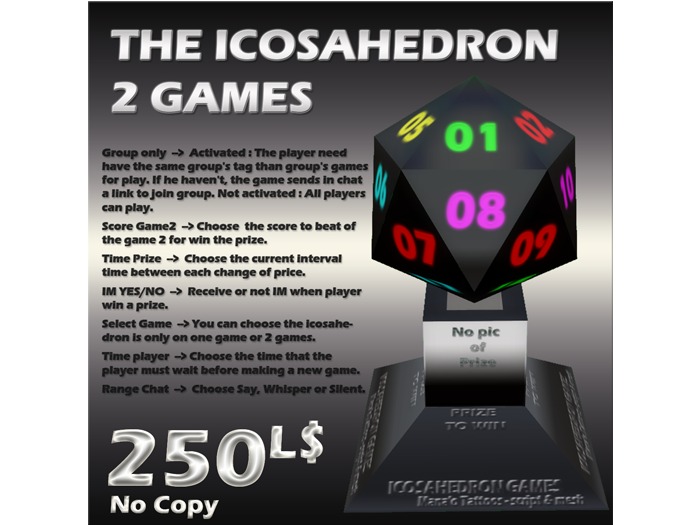
"Group only" --> Activated : The player need have the same group's tag than group's games for play. If he haven't, the game sends in chat a link to join group.
Not activated : All players can play.
"Score Game2" --> Choose the score to beat of the game 2 for win the prize.
"Time Prize" --> Choose the current interval time between each change of price.
"IM YES/NO" --> Receive or not IM when player win a prize.
"Select Game" --> You can choose the icosahedron is only on one game or 2 games.
If you select one game, player can play only this game.
If you select the 2 games, player can chooses the game he want play.
If you select "Stop game", Icosahedron enters sleep.(click again for activate)
"Time player" --> Choose the time that the player must wait before making a new game.
"Range Chat" --> Choose Say, Whisper or Silent.
"Cancel" --> close the windows
LONG Click left on the game for open second Owner's menu :
"Reset all" --> Reset all the scripts. Attention, all settings will be deleted.
"Cancel" --> close the windows.
Player Menu is :
"Enter Game1" --> For enter in the game.
"Rules Game1" --> For see the rules of game.
"Enter Game2" --> For enter in the game.
"Rules Game2" --> For see the rules of game.
Need Help ? IM luis Widdershins.


