![! J&C - SuperCam-Hud 1.2 [Boxed]](https://slm-assets.secondlife.com/assets/11771197/lightbox/SuperCam-Hud_1.jpg?1433842108)

* SuperCam-Hud:
---------------------- ONE SCRIPT DOES IT ALL:
Use it for:
-------------
You stand on the Stage and have to move somewhere.
You start moving, the Cam snaps in behind you and shows you the Crowd.
And your Screen gets black for a minute, you have Lag, you may crash.
But now you can avoid such Situations.
Or have a quick Look at different Places at the Sim you are or at surrounding Sims.
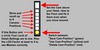
Big Button: Move the Cam above the Avi, looking down at the Floor,
and keep it there when the Avi moves. This avoids the Lag when you
cam into the Crowd while moving.
Next 6 Buttons: Store your Camera-Positions! Store eg. Left Side of the Stage,
Front, right Side, the Place where you stand, the Views at the Tipjars, and
switch from one to the other without scrolling and camming, just by a klick.
The round Button below toggles the Function of those Buttons:
Green means store the Camera-Position
Red means delete the stored Position
Yellow means move the Camera to the stored Position.
The round Button is also a Indicator for the LOD-Factor.
It will look strange if this Setting is 2 or lower.
Of course you can always cam around as you like to.
Hit ESC to free your Cam or to move it back.
- Prevents you from Crashing because of looking into the Crowd
- Lets you quickly change between different Viewpoints


Great product and maker
The hud it's self is great I'm using it to set camera positions for footage I'm sending to youtube and I can't say enough about it's maker he noticed I ordered 2 of them, one I had misspelled the name of the ava I wanted it delivered to so I lost it, he was kind enough to contact me later and refund me when I told him what happened!
Thanks Carsten!