
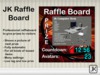
JK Raffle Board v3.1
Professional fully automatic raffle board for clubs, shops, and other venues. When the timer reaches zero the board will give away a prize to 1 random avatar. The board shows a picture of the next prize to be won, a nice little bit of advertising for the sponsor. The board also shows a countdown timer and the number of avatars present.
- Shows a picture of the prize. Sponsors love this!
- Customize the appearance of the board. Put your own logo!
- Prizes can be copy or no-copy
- Automatic avatar entry, avatars do not have to click to enter the raffle.
- Automatic start and stop when there are sufficient avatars present.
- Automatic prize cycling (one by one) or random selection.
- Automatic avatar cycling, avatars will not win again until all other avatars have also won.
- Says "hello" to avatars when they get in range.
- Shows giftbox-particles going from the board to the winner.
- Sends a message to the board-owner and to the sponsor when a prize is given.
- Setting from 1 to 99 minutes between give-aways.
- Setting for minimum number of avatars present.
- Setting for avatar distance.
- Setting for group-only (avatars must wear the group) or any group.
- Setting for prize sequence.
- Easy-to-use admin menu.
- Only 1 low-lag script.
- Only 1 prim.
The board is designed to give away boxed items several times during an event. You can load the board with copy boxes (give many times) and no-copy boxes (give once). Boxes can be from multiple sponsors. The boxes can (should) be accompanied by a picture. The board cannot give money, and therefore does not need access to your account (you can give away boxed giftcards, though). The maximum period between gifts is 99 minutes.
THE ADMIN MENU
Click the board to get the admin menu.
- Only the owner of the board will see the admin menu, other people will get a nice
message that there is no need to click the board to enter the raffle.
+ Stop: to stop the raffle. The timer is deactivated, no prizes will be given out.
+ Start: to activate the raffle. The board will now automatically start (and stop) the timer
when there are sufficient avatars present.
+ Timeout: to set the number of minutes between prize give-outs.
+ Avatars: to set the minimum number of avatars that must be present.
+ Group: to select if avatars must wear the same group as the board.
+ Range: to set the range inside which avatars are detected and messages from the
board can be heard.
Note: The board only counts avatars on the parcel, not the entire sim.
+ Sequence: to set the order in which prizes are selected to be given out.
HOW TO CUSTOMIZE APPEARANCE
Included with the board is a template image of the front of the board, with cut-outs where
the prize picture and counters are. You can use that image as an example to make your
own board front, for example with GIMP or Photoshop.
NOTES
- The board only gives prizes to avatars present on the parcel, not the entire sim.
- Prizes can be given out at random or alphabetically. In the latter case you can control
the order by for example numbering the boxes ("01 ***", "02 ***", etc.).
- In group-only mode the board will only give prizes to avatars that are wearing the same
group as the board. To set the group make sure you are wearing that exact group when
you rezz the board, or you can "edit" the board and set the group in the "general" tab.
- The owner of the board and the creator of the current prize cannot win that prize and
are not counted in the number of avatars.
- The board has no limits, it can easily handle thousands of gifts and hundreds of avatars.
(C) 2016 Jkessels Resident
- Fully automatic
- Shows picture of next prize
- low lag low prim

