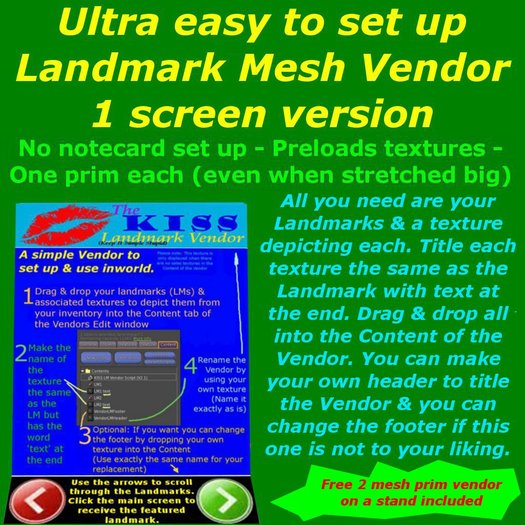


Hi and thank you for looking / buying this vendor.
It is designed to:
Be easy to set up & use;
Preload textures;
Be as low prim as possible.
Before you start you will need to have:
Your Landmarks (LMs) all titled right, such as:
LM 1
A corresponding texture you will title:
LM 1 text
(Remember, the above is an example, you can call your items and textures what you wish)
Drag and drop all your prepared LMs & Textures from your inventory to the Content tab of the Vendor whilst in Edit.
If you have a shop logo you want to replace the KISS Vendor logo with, simply rename a copy of the texture in your inventory:
VendorLMHeader
and drag and drop it into the Content tab of the Vendor Edit window after removing the one thats there already.
You can also replace the footer - simply rename your texture:
VendorLMFooter
remove the one there - drag and drop the replacement into the Content tab of the Vendor Edit window.
(The originals are in the folder / box delivered to you)
Close the Edit window and click the header (where it displays the Kiss Vendor logo). This will reset the script.
You can have the vendor automatically scroll through the items on sale by replacing the 0 currently displayed in the Description line of the General tab in the Edit window with the number of seconds you want the vendor to wait before moving to the next item. Leaving the 0 there will prevent this automatic function from operating and only the clicking of the arrows will forward/reverse the images. Be sure to reset the vendor by clicking the Header.
NOTES ON THE FREE VENDOR ON THE STAND:
The stand is set up with a texture animation script and a texture that has been placed on the front face of the Stand. This is designed to make it attract people to it. The stand is modifiable so that you can replace the texture or remove it altogether should you wish. I would suggest that if you remove the texture you should remove the script the stand also contains.
Please note: Scripts are copy only.
Please leave feedback after you have given me time to resolve any problems.
Thank you,
Aragon Sommer.
- Ultra easy to use, no notecard or complicated setup
- Preloads textures; LI / Prim count = 1 each: FOR DISTRIBUTING LANDMARKS
- Use your shop logo on header; You can change the lower arrows too
- Can be static display or auto-scroll (timing user set)
- KISS - Keep It Simple Stupid - That's our motto


Exactly what i was looking for!
great looking low prim vendor to hand out lmd to all my tenants' shops, and a great price, ty!

