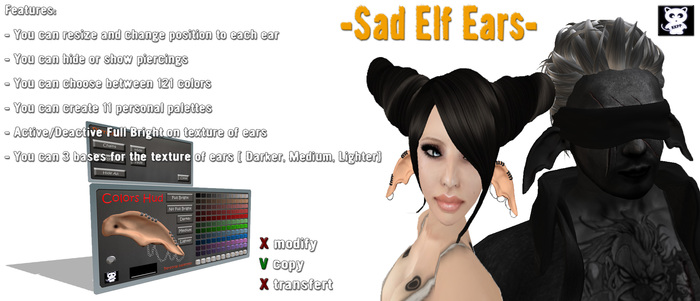
A pair of sculpted Elf Ears UNISEX with an HUD to control them.
Read the lines below to know the features:
===============================
You can fix the position and the size of the ears just clicking them and a Dialog will pop up:
Done: Close the dialog like clicking 'Ignore'
Scale: Scale the item with these options: +1%/+5%/+10%/-1%/-5%/-10%
Position: Change the position of each ear, you'll find 2 buttons 'ESX' for the left ear and 'EDX' for the right one
Options: Let you go back to the original size and position of the ears just clicking 'Revert size' or delete all scripts about resize and position (WARNING: BEFORE PRESS BUTTON ' DELETE' MAKE A COPY OF YOUR EAR)
===============================
HOW WORKS THE HUD
To change color of ears, of the piercings or show/hide them u need to use the HUD.
On Right you can see 11 lines with 11 different colors (this means you can choose between 121 colors), the last line has 11 customizable palettes u can save your own color just clicking it, choosing 'New RGB' and then writing in local chat the new values, following the istructions you'll read (You have 60 sec before time expires)
On Left you see an ear to look how will be the final color, you can also add/remove 'Full Bright' , change the base texture choosing between 'Darker', 'Medium', 'Lighter'. To send the right color to the ears you need only to click the ear on the hud when you'll be ready
PAY ATTENTION: YOU CAN SEE THE DIFFERENCE BETWEEN 'FULL BRIGHT' AND 'NO FULL BRIGHT' ONLY ON YOUR AVATAR OR REZZING THE HUD ON GROUND, BECAUSE FULL BRIGHT REMOVE SHADOWS ON AN OBJECT BUT AN HUD CAN'T HAVE SHADOWS ON IT SO DON'T WORRY IF YOU DON'T SEE DIFFERENCES BETWEEN FULL/NO FULL BRIGHT.
On Top you can see a button 'Piercings', clicking it a new part will appear. There you can change color of Chains, Rings just active the buttons before change the color. You can also choose to hide Chains, Rings or both (Remember to active again them if you want see again the piercings).
On Bottom Left you can see a little button, clicking it you'll block your avatar in a kind of appareance. This can be useful if you can't rezz a standpose and you want fix your ears.
ANOTHER THING... TO WEAR PROPERLY THE EARS BETTER IF YOU CREATE A COPY OF YOUR SHAPE WITH SIZE FOR EARS = 0
===============================
Don't forget to visit our shop and take a look around, we have Midnights Mania, Lucky Chairs, and others surprises =^.^=
Keyword for search: elf, ear, sad, piercing, ring, chain, unisex, hud, controlled, sculpt maps, full perm, sculpted prims, sculpty, sculpties


love the shape
love the shape and style and hud options and features. ears are connected to eachother so be warned. resize via clicking the ear itself, and color change with show/hide earring options via the hud.