⚠ Please read before you buy. ⚠
▬▬▬▬▬▬▬▬▬▬▬▬▬▬▬▬▬▬▬▬▬▬▬▬▬▬▬▬▬▬▬
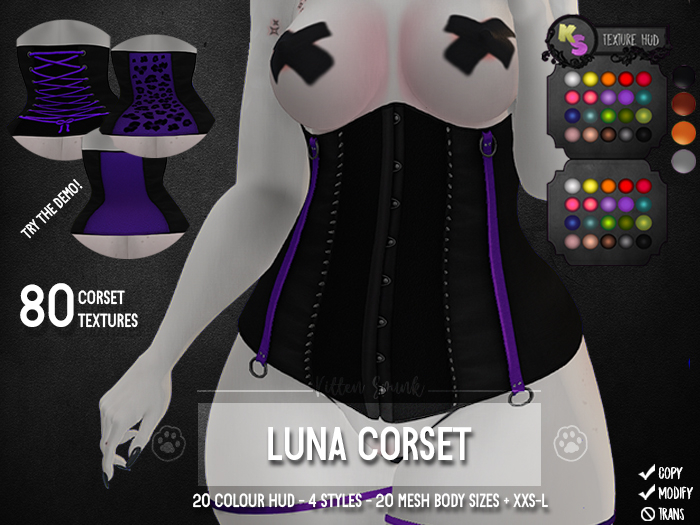
+KS+ Luna Corset
▬▬▬▬▬▬▬▬▬▬▬▬▬▬▬▬▬▬▬▬▬▬▬▬▬▬▬▬▬▬▬
---- Wʜᴀᴛ ᴅᴏᴇs ɪᴛ ᴄᴏᴍᴇ ᴡɪᴛʜ?: ----
☾- 1 HUD with 20 corset colours
☾- 1 black corset HUD featuring 20 back panel colours
☾- 1 black corset HUD featuring 20 back panel colours with cheetah print
☾- 1 black corset w/ ribbons HUD featuring 20 ribbon colours. The ribbons are hand-drawn!
☾- 20 different mesh body sizes
☾- XXS-L default rigged sizes
☾- Alpha layer
☾- Instructional notecard
---- Wʜᴀᴛ ɪs ɪᴛ?: ----
A rigged mesh corset with small spikes.
HUD has several faces: corset, straps and metals. Alternative HUDs are provided where you can have a black corset with a coloured back panel, ribbon closing or cheetah print all with 20 colours. This means a total of 80 textures for the corset.
Sizes included:
- ebody Reborn
- Maitreya Lara & Maitreya Lara Petite
- Kupra & Kupra Kups
- Prima Busty & Petite
- Gen.X Classic & Curvy
- Legacy, Legacy Perky & Legacy Perky Petite
- Belleza Venus, Isis & Freya
- Slink Hourglass & Physique
- Tonic Fine & Curvy
- TheMeshProject
- Default rigged sizes XXS-L
---- ʜᴏᴡ ᴛᴏ ᴛɪɴᴛ?: ----
1. Rezz the corset
2. Right click the item in your inventory and select "Edit".
3. In the tool menu along the top use "Select Face" and click the part you wish to colour.
4. Under "Texture" go to "Blinn-Phong" and click the box under Tint, use this to select your colour.
---- ɴᴏᴛᴇꜱ ----
Due to not having an easy way to input normal maps,
If you use the ribbon backing version here is the normal map if you wish the strings to look more defined. Use "Select Face" as it's only for the corset part:
- 80 different textures in HUD
- 20 different mesh body sizes
- 5 default rigged sizes
- Alpha layer included