#Introduction
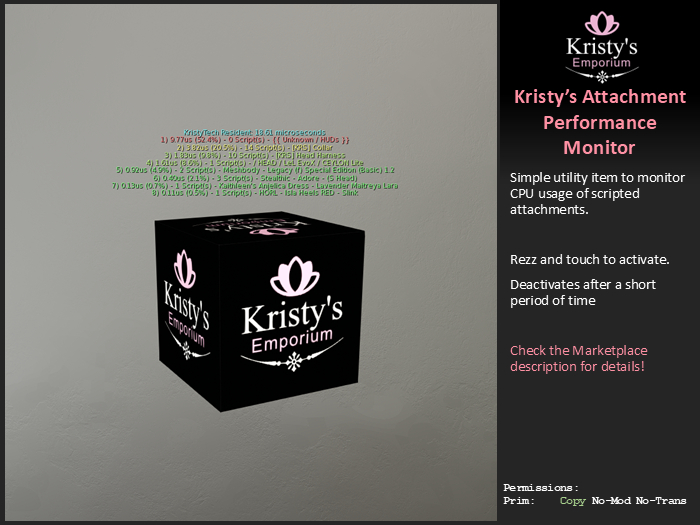
Kristy's Attachment Performance Monitor displays the attachment CPU usage statistics.
Have you even been to a region with those avatar script tracking boards? I did you ever wonder what exact attachment(s) are putting you at the top of the list?
The Attachment Perf Monitor tells you exactly that!
It doesn't measure the performance itself, it just fetches the stats from the simulator, sorts and displays them.
It uses llGetObjectDetails() function and OBJECT_SCRIPT_TIME to fetch the stats for the avatar, and each individual attachment.
#Usage Instructions
1) Rezz it somewhere
- If you wear it as an attachment, it will be contributing to the stats and skewing the percentage.
2) Touch it - For the next 2 minutes it will show the stats
CPU time is shown in Microseconds, to avoid having lots of numbers that are 0.0000123.
Percentage is based on total time used by attachments.
It is best to wait at least 5 minutes after attaching an attachment or moving to another region for stats to settle down.
The sim tracks average script performance for last 30 mins, or since the object has been rezzed if it happened less than 30 min ago.
This means that a newly attached items will have a burst of activity as scripts handle all the attach(), on_rez() events, but then settle down into their normal activity.
This also means that an avatar that comes into a region will also have a big spike of activity, which will then settle down over time.
#Disclaimer
I initially made this to see how much impact my own scripts use and how that compares to other items or brands and to see if I can improve my scripts.
This tool is here to help you make informed choices.
It is not a meant for calling out or harassing creators or residents using the creations.
Informing creators about unusual script load might be useful, but please be polite and constructive.
# v1.0.0
+ Initial public release.
