
---------------------------------------------
LD Sculpt Organizer
---------------------------------------------
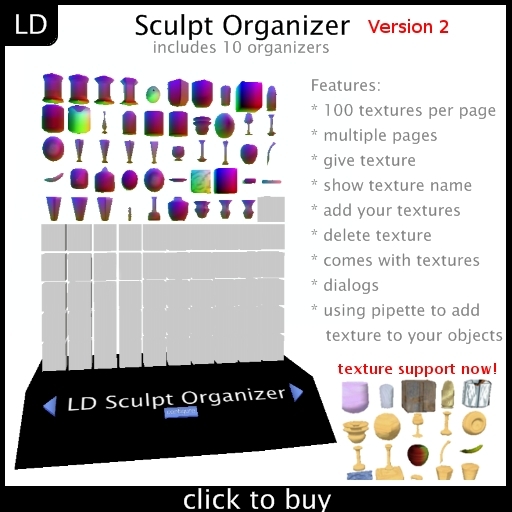
100 sculpt previews per page. organize your sculpts now!
UPDATE 31.08.2008: Fixed memory bug. New features!
UPDATE 13.07.2008: It's much faster now!
features:
- select next page: use the blue arrow button >
- select previous page: use the blue arrow button <
- fill organizer with textures: click on the blue "configure" button and select "allow drop textures". drag your textures in the red box of the texture organizer (holding the ctrl-key). don't forget to deactivate it ("deny drop textures") after you put your textures in it because everyone could place textures in the organizer.
- get a copy of a sculpt-texture: click on the prim and select "give it to me"
- delete a sculpt-texture: click on the texture and select "delete it"
- put sculpt texture on your objects: just select the texture via pipette
- change single preview prim: you can select sphere, torus, plane and cylinder as base prim. click on the prim and select the type.
- change all preview prims: change the prim base for preview prims. click on "configure" and select "change preview" . Select "sphere preview", "torus preview", "plane preview" or "cylinder preview".
- *new* change prim texture: put a texture in the sculpt organizer with the same name as the sculpt texture but with a ".texture" extension. Example: mysculptie, mysculptie.texture
- *new* reset: click "configure" and "reset" to reset all scripts
- *new* rename organizer: it is possible to change the name of the organizer. Click "configure" and "rename" to start renaming. type in the main chat (without brackets). Replace MYNEWNAME with the new name you want.
SEE ALSO:
http://static.xstreetsl.com/modules/Marketplace/Images/4/2/e/42ea4e6e59401c24928ba9c53ac68babthumb1.jpeg http://static.xstreetsl.com/modules/Marketplace/Images/c/c/5/cc5a14e93cedcd88fdad45f3b55bd52bthumb1.jpeg http://static.xstreetsl.com/modules/Marketplace/Images/a/9/1/a9191494ba7d531c9fcc7b5a24dcaffdthumb1.gif
http://static.xstreetsl.com/modules/Marketplace/Images/9/b/6/9b6344ce000e2d5d03ac2041c010b3cbthumb1.jpeg http://static.xstreetsl.com/modules/Marketplace/Images/d/3/d/d3d947ab64059be7110c140fcccc7f8dthumb1.jpeg http://static.xstreetsl.com/modules/Marketplace/Images/4/6/8/468b4bb593860d229069841f15962ef2thumb1.gif


Disappointing-not intuitive enough in my opinion.
At a glance, what I like: -Large storage capacity
-Stitching type preview buttons
-Delete/receive texture buttons
At a glance, what I dislike: -No "Mirror" preview
-No "Inside Out" preview
-Can't preview "No Mod" sculpts at all because of gadget permissions.
-Can't delete textures from the "Contents" tab because of
gadget permissions.
Explaination:
I own thousands of sculpt maps, some are duplicates. I have spent hours deleting them through the menu, when it could have taken minutes through the contents tab. Instead I could only delete duplicates one by one by clicking the previews and waiting for the gadget to reset after each delete. Deleting duplicates through the contents tab is more efficient because duplicates will share the same file name. I also expected to be able to preview "Mirror" and "Inside Out" if preview by stitch type is allowed. It seems like the logical progression to me. Finally, I'm disappointed that I have to purchase a different sculpt organizer just to display my No Mod sculpts. I look forward to an update of this product.
Date purchased: 1/10/2008 for $800.
First off, let me say that Langweiliger Dreier is wonderfully responsive and accommodating to deal with. My issue with his organizer had nothing to do with the item itself, but was simply that the size it comes in was too small for me to see details of my sculpts comfortably. I wrote to Mr. Dreier, and in less than a day he had responded and given me larger organizers... double the size. Yes! I can see now :)
The organizer itself is very easy to use, and holds a LOT of sculpts. Adding sculpts is very easy, as is deleting from the viewer. I have used several texture and sculpt organizers, and this is about the best I've come across for ease and straightforward use.
Works PERFECTLY, great for helping me sort and store my sculpts, only thing that would be better, which based on scripting, prolly not possible, if it would go thru the updating faster and if it was copy not transfer, but still, love it


