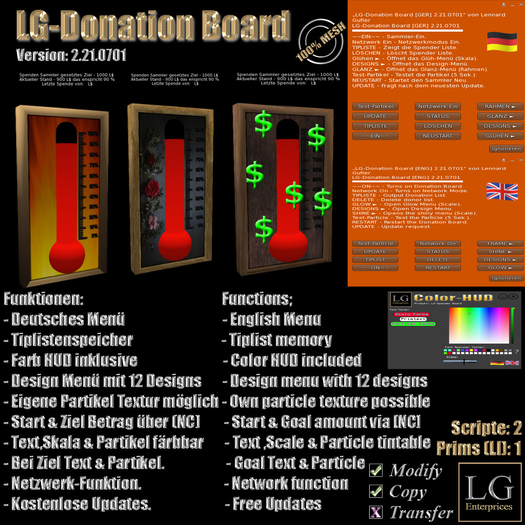

Instructions LG Donation Board [ENG] 2.21.0701
▀▀▀▀▀▀▀▀▀▀▀▀▀▀▀▀▀▀▀▀▀▀▀▀▀▀▀▀▀▀▀
Thank you for choosing an LG Enterprices product !!!
- The Donation Board is a menu-driven donation collector for use by the owner.
- It is simply placed and switched on!
- In the delivery condition it is set to 1000L limit and starting amount of 900L (see notecard setting)
- Exactly this state is restored with a restart!
- Tips and tip lists are saved until the user switches off the donation collector or the limit is reached !!
Scope of delivery;:
▀▀▀▀▀▀▀▀▀▀▀▀
1x LG Donation Board [GER] 2.21.0701 (mod / copy / no transfer) (Mesh with PrimCount: 1)
1x LG Donation Board [ENG] 2.21.0701 (mod / copy / no transfer) (Mesh with PrimCount: 1)
1x LG Donation Board [Color-HUD (GER / ENG)] [Wear / Wear] (no mod / copy / no transfer)
Functions:
▀▀▀▀▀▀▀
- Complete German and English menu (2 versions)
- Switching the fundraiser on and off.
- Menu repetitions for easier operation.
- Glow effect menu for setting the scale glow.
- Gloss effect menu for setting the scale gloss.
- Incl. Color HUD with more than 16 million colors for (particle color / PrimText color / scale color)
- Menu for design selection (11 designs can be selected.)
- Menu for frame selection (11 designs can be selected.)
- Supports SL display names for donors.
- Real scale in percentages.
- Donor lists function
- STATUS function (MENU).
- Own particle texture configurable via notecard.
- Network function for synchronously running collectors per Sim
- Update function for free updates
- 100% MESH (only 1 prim) in the delivered size
Function (operation):
▀▀▀▀▀▀▀▀▀▀▀▀
The donation collector starts with the starting amount that is specified and runs until the goal is reached.
If this is achieved, he stops the incoming donations and gives the thank you text from the area
100M is received (chat).
A particle explosion lasting 60 seconds will be started! When this is over, the collector switches off.
Color HUD:
▀▀▀▀▀▀▀
Use the supplied Color HUD to set the colors for scale, PrimText or particle color.
Simply wear (put on) the color you want and click the button for
Press (Particle, PrimText or Scale). It is important that you keep the maximum distance to the fundraiser
of 5 meters when transmitting.
With the Color HUD you have a maximum of ~ 16.7 million colors to choose from.
Change size:
▀▀▀▀▀▀▀▀▀▀▀▀▀
The size of the fundraiser can be adjusted but requires switching on after the first time
a reboot. Only then can the display display correctly again.
Setting the notecard:
▀▀▀▀▀▀▀▀▀▀▀▀▀▀▀▀▀
Settings are changed in the notecard with the name.
The lines are self-explanatory !!!
- GOAL | 1000 Specifies the donation goal at which the donation ends.
- START | 900 (as an example, the collector starts with L $ 900 .. this number must be between 0 and the target (limit).
- THANK YOU TEXT | Here comes the thanks text that should be displayed (freely selectable).
- NETWORK | 2999 (The network channel for all synchronously running collectors is specified here.)
- PARTICLE-TEXTURE | Texture UUID (Here you can specify your own particle texture.)
Scripte sind No Modify !!
You can also find us in our main store in-game:
Voir l'article dans Second Life- English Menu.
- Notecard Configurable
- Different Designs via Menu
- Goal Text and Particle
- Free Updates
