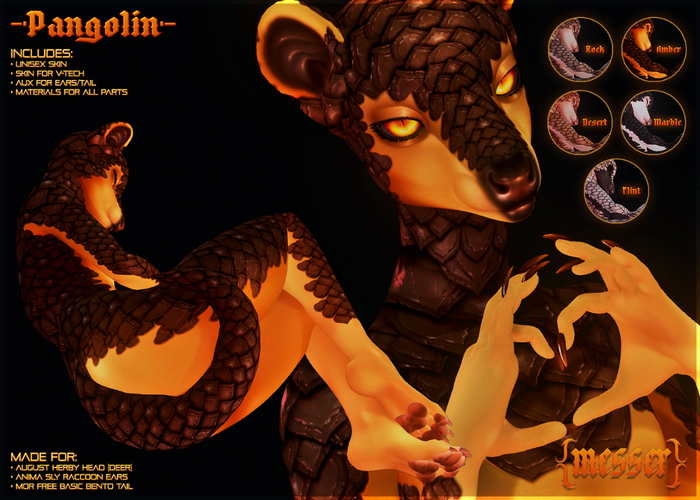

BIG PICTURE WITH NO SHADOWS ETC
https://f2.toyhou.se/file/f2-toyhou-se/images/69112705_HX7m5vNAo4PoVn8.png
Hello there!
Thank you so much for buying my product! I hope you like it.
If you want to see the other things I make you can view my store here:
https://marketplace.secondlife.com/stores/186077
I no longer read or respond to reviews, so if you come across any issues
please contact me DIRECTLY! Offline IMs go to my emails <3
▀▄▀▄▀▄▀▄▀▄▀▄▀▄▀▄▀▄▀▄▀▄▀▄▀▄▀▄▀▄▀▄▀▄▀▄▀▄▀▄
❝ Socials ❞
● Patreon
https://patreon.com/iski
Active Patrons can now get tons of gifts via Messer Champions
● SL Twitter
https://twitter.com/MesserKatze
● Flickr
https://www.flickr.com/photos/mismatch/
● Ko-fi
https://ko-fi.com/iski
● Art twitter
https://twitter.com/iskikun
▀▄▀▄▀▄▀▄▀▄▀▄▀▄▀▄▀▄▀▄▀▄▀▄▀▄▀▄▀▄▀▄▀▄▀▄▀▄▀▄
❝ Included ❞
● BOM LLUV compatible skin
Optimized for eBody Reborn and eBody Reborn with V-Tech Chest
but can be worn on other bodies/chest options due to zero chest shading
● 1 universal layer for ears (AUX2) & tail (AUX3)
● Tintable eyeliner
● Tintable waterline
▀▄▀▄▀▄▀▄▀▄▀▄▀▄▀▄▀▄▀▄▀▄▀▄▀▄▀▄▀▄▀▄▀▄▀▄▀▄▀▄
❝ Requirements ❞
● ///ANIMA\\\ Sly Raccoon Ears by Anima Alpha
https://marketplace.secondlife.com/p/ANIMA-Sly-Raccoon/23625102
● [• AUGUST •] - Herby head by AugustShop
https://marketplace.secondlife.com/p/AUGUST-Herby-head/24989267
** SPECIFICALLY WEAR THE DEER HEAD ***
● [M.O.R] free basic bento tails by Zexen Alecto
https://marketplace.secondlife.com/p/MOR-free-basic-bento-tails-NO-ANIMATIONS-NO-DEFORMERS-JUST-TAIL-MESH/14258581
** IT'S FREE **
Any BOM mesh body that's compatible with LL UV.
Though this was optimized for and tested on
eBody Reborn and eBody Reborn V-Tech
▀▄▀▄▀▄▀▄▀▄▀▄▀▄▀▄▀▄▀▄▀▄▀▄▀▄▀▄▀▄▀▄▀▄▀▄▀▄▀▄
❝ User Guide ❞
Ears
● Wear or rez your ears
● Right click on the ears
● Click Edit
● Click on the texture tab in the edit window
● Click on the texture box to load your texture inventory
● Check "Bake"
● Click on the drop-down menu and select BAKED_AUX2
● Move to the Texture tab
● Change Alpha mode to "None" in the drop down menu
Tail
● Wear or rez your tail
● Right click on the tail
● Click Edit
● Click on the texture tab in the edit window
● Click on the texture box to load your texture inventory
● Check "Bake"
● Click on the drop-down menu and select BAKED_AUX3
● Move to the Texture tab
● Change Alpha mode to "None" in the drop down menu
All textures provided are to be used as is or as described in this notecard ONLY.
Exporting, altering, heavily referencing or tracing my textures will
result in you receiving a permanent ban from my store.
DMCA's will be filed where necessary.
❝ Materials ❞
Materials have also been included but if you don't know anything about Second Life materials like normal/specular maps then do not use them.
Materials can be added simply by selecting the face/object you want to apply them to and going to the Texture tab, selecting Bumpiness or Shininess and finding the texture made for that face/object.
I'm not able to offer more detailed step-by-step support for materials for now, please utilise search engines or asking friends to help you if you don't understand how to use these files.
▀▄▀▄▀▄▀▄▀▄▀▄▀▄▀▄▀▄▀▄▀▄▀▄▀▄▀▄▀▄▀▄▀▄▀▄▀▄▀▄
❝ Support ❞
● If you find a bug or error please contact me but
remain patient and polite. Be sure to describe the
issue in as much detail to avoid confusion. Include
screenshot(s) if required. I will help when I am able.
● I do not take requests, suggestions.
Commissions are taken through Twitter and Patreon.
https://patreon.com/iski


