
New version 4.0
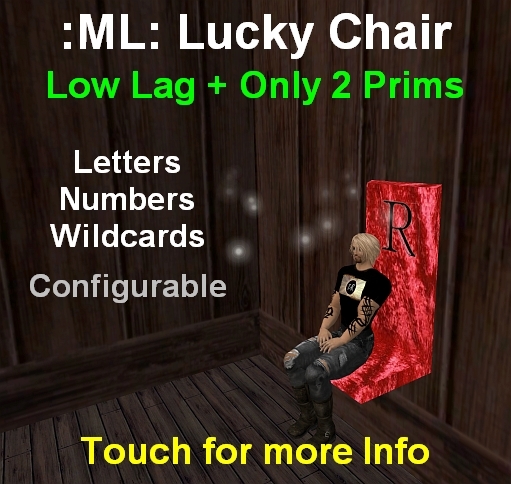
First off you may be wondering, why another lucky chair? It's a good question. When this chair was developed there wasn't nearly the number of different chairs as there are now, and if you are looking for a do everything chair, look elsewhere. This chair was designed to be LOW PRIM and Low Lag, while doing the basic lucky chair function with some nice options. I think it fills a niche, especially for the very small stores or really anyone who wants low prim, low lag over flash. In fact, if you don't want the letter/picture/time display, you could delete that prim and it would be a 1 prim lucky chair (or actually, unlink it and take it, in case you change your mind).
Aside from the display on the front of the chair, the letter/number, time left, and current prize is optionally displayed as floating text above the chair and in the chair's description. The picture display on the front of the chair will display prize pictures that you place in the display prim's inventory (not in the chair's inventory). Use edit linked parts as click on the display prim and add textures for the prizes you want pictured. The texture name must be exactly the same as the associated prize's name in the chair inventory with a .pic added on the end (see the sample already there). If there is no picture for a prize a generic prize box is shown instead. The picture display is optional and will be blank if turned off.
The chair itself is mod, so you can texture it as you like. You can also play with its shape, but the sit might end up being off it you change it too much. Note that the scripts are no mod.
Set up is easy. Just rez the chair and move it where you want it (it looks best against a wall or post or something). Edit the chair and open the configuration notecard. There you set the time between changes and percentage of wildcards. You can also select whether the chair uses whisper or say (there is purposefully no shout option). You can also choose whether the chair will IM you when someone wins. Finally you can adjust the touch message which I will talk about next. Note that based on feedback, version 3 eliminates the separate numbers and replaces them with a single 0-9 symbol. This is also where you control the optional displays.
The chair can be stocked with prizes that are copy or no copy to you. Prizes that are no copy to you will leave the chair when given away, the copy ones can be given away again and again. Remember to set the next owner perms on the prizes to what you want them to be. The chair currently comes with a couple of no copy versions of my inexpensive products as well as a copy and no copy freebie, but this is subject to change without notice. Note: Prizes MUST be objects, so if you are giving away a clothing item, animation, etc.; you must put it in a box. But you wanted to do that anyway, so you could throw in your landmark(s) and/or notecard(s).
When you, the owner, touch the chair you get a control menu (new in version 3), where you can get the call text (described below), flip the chair (randomly select new letter/prize), make the current letter a wildcard, or turn off the chair.
When the chair is touched by anyone but you, it gives a message in that person's chat history, formatted to be pasted into lucky chair groups. That way, you, someone working for you, or just someone trying to win a prize can easily post notices for your chair. The chair automatically generates the letter, prize, and chair location in the message. You can override the location (if you would prefer they land in another place), and also add your own personalized message on the end.
Come try out a chair at my shop. I have a couple of these chair running on a fairly frequent cycle.
See item in Second Life


Suits my needs perfectly for my small stores - and only 2 prims, and it's so cheap! 100% 5 stars.
I like this chair, finally i found one that WORKS!!!! And not expensive! Thanks for making this usefull Chair!!!!