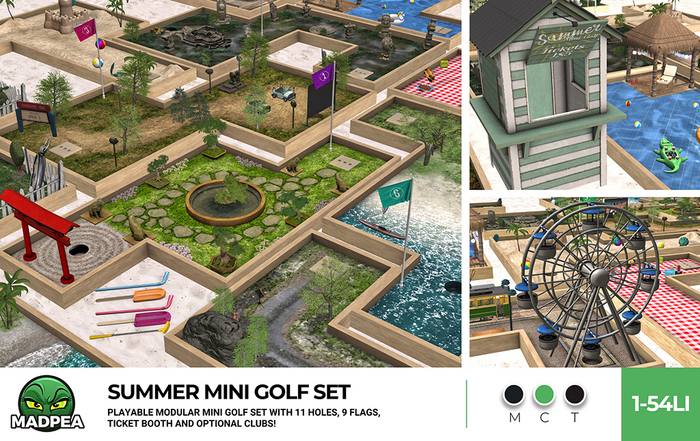

Tee off into the Summer sun with MadPea's Summer Mini Golf Set! 11 sun drenched courses of mini golf fun are ready to place and play from the pack, and how to play instructions are included!
The following items are included in this set, and instructions for play are below.
Clubs (wearable, but not needed to play)
Flags - 1 li each (set of nine)
Camping Trip Course - 36 li
Drive-In Course - 44 li
Inca Course - 32 li
Oriental Garden Course - 37 li
Picnic Course - 34 li
Pool Party Course - 39 li
Road Trip Course - 54 li
Sandcastle Course - 27 li
Summer Market Course - 65 li
Tea Party Course - 39 li
Ticket Booth - 11 li (sits one avatar)
Treasure Island Course - 36 li
Anyone can click on any of the mini golf holes, to play. The player will then be offered a HUD. Click on 'Get HUD' and accept permissions to attach the HUD to your screen. If the player is already wearing a HUD, they will be asked if they want the hole to rez a ball for them.
The ball will rez on the tee mat at the hole the player has clicked on. The player then clicks on any of the plus or minus symbols on the HUD to start 'aiming mode', which will show a particle beam for the direction you want to aim the ball toward. (Clicking on the big plus or minus buttons will rotate the ball 15˚ left or right. The little plus or minus buttons will rotate the ball 3˚ left or right.)
To putt the ball, click the pea on the HUD. The strength bar will fill up the longer the player click and holds. Once the player releases the held click, the ball will be putted. (Note: If the player is wearing one of the MadPea clubs, the club will do a golf swing animation as the ball is putted. The clubs are optional for game play.)
Scoring: If the ball leaves the green, the player scratches. There is a one stroke penalty and the ball returns to the tee. The HUD will track the player's strokes and will publicly announce the count in local when the ball lands in the cup.
It is up to the players to keep track of their final score and taking turns amongst each other.
The owner of the courses has the option to change them to be group only by clicking on the hole to bring up the menu.
Land impacts of modifiable items may increase if the are resized. Mini golf courses are not able to be resized.
Land Impact: Listed above.
Copy | No Modify | No Transfer
▀▀▀▀▀▀▀▀▀▀▀▀▀▀▀▀▀▀▀▀▀▀▀▀▀▀▀▀▀▀▀▀
✄ Original mesh created by the MadPea team.
✄ All MadPea products are sold as-is. No change or alteration requests will be accepted at any time. MadPea does not currently take custom orders.
Artikel in Second Life anzeigen- Fully interactive mini golf course kit!
- Anyone can play!
- Clubs can be passed to other players (although no needed to play).
- Themed design set.
- Original mesh.


Love this... !!
Great set for fun!! Curious why there are not 11 flags when you have 11 holes?? would be helpful if you did
tiny tiny tiny
useless - thats really all i can say - total garbage
Primmy, but...
They may be a little high in prim, but this is by far my favorite mini-golf set to date. So pretty and detailed for summer and fits so many aesthetics. I would love to see them resizable!
Best mini golf, maybe golf course of any kind in SL.
Absolutely more than even advertised, have to see into believe and up close. Interactive objects, moving, opening and closing. Just FUN.

![MadPea Summer Sunglasses [Add Me!]](https://slm-assets.secondlife.com/assets/20952573/view_small/Summer_SunglassesAD.jpg?1530219127)
![MadPea Umbrella Hat [add me!]](https://slm-assets.secondlife.com/assets/23295891/view_small/Umbrella_hatsAD.jpg?1554502098)