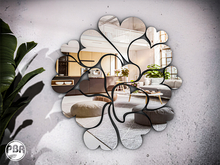
֍ .imegica. Mirat reflexMirror Set (PBR) DEMO
• THE DEMO VERSION WILL AUTO DELETED AFTER 10 MINUTES.
• Mirror: 7 land impact.
• Reflex's Mirror.
• 5 wooden textures choice by menu driven.
• Vase: 3 land impact.
• Candle Light ON/OFF by touch.
• Double texture layers "PBR + Legacy".
• 100% original mesh. Materials enabled.
• Modify, copy, no transfer. [no mod in the DEMO version].
֍ IMPORTANT | How to see yourself on the mirror:
• You need have the most recent Second Life Official Viewer installed.
• The quality of the reflection will be based on your computer graphics power and SL settings.
• On the top tab menu click on me/Preferences or type Ctrl+p. Go in Graphics tab and click in "Advanced Settings...".
• For a acceptable reflection view you need define this options:
• "Reflection Detail" need be at least in Static & Dynamic. Realtime for a better view.
• "Mirror Resolution" 1024 is enough.
• "Mirror Resolution" 2048 can cause FPS reduction. Use only for take pics.
• "Mirror Update Rate" use according to your hardware limit.
֍ For who is using the Firestorm PBR:
• On the top tab menu click on Avatar/Preferences or type Ctrl+p. Go in Graphics tab and choose General.
• For a acceptable reflection view you need define this options:
• Check the "Screen Space Reflections" & "Mirrors".
• "Reflection Detail" need be at least in Static & Dynamic. Realtime for a better view.
• "Mirror Resolution" 1024 is enough.
• "Mirror Resolution" 2048 can cause FPS reduction. Use only for take pics.
• "Mirror Update Rate" use according to your hardware limit.
֍ Policy:
• BEFORE BUYING, TRY THE DEMO. ..::NO REFUNDS::..
֍ Any doubt or question, contact Jackie Brenner.
- PBR Materials
- Reflex's Mirror
- Double texture layers "PBR + Legacy"
- 5 wooden textures choice by menu driven


Great instructions!
It seems weird to give a review for a demo, but I found the instructions very helpful. I was about to leave a nasty review because I couldn't actually see my reflection, but after reading the instructions and changing a few settings in my Firestorm viewer, it works. I was finally able to see myself in PBR materials. Thanks!