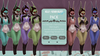
![[MoMu] Kenan/kelly Vulpes Brights pack](https://slm-assets.secondlife.com/assets/32448682/lightbox/Brights%20pack1.jpg?1668861907)
Welcome!
This is a KEMONO mod using the bom system.
It is for KEMONO not MAITREYA or EBODY etc.
The mod is PG!!!!! It doesn't have bits!!!
What is included (for each colour) :
♡texture for Tail Mod/copy
♡texture for Ears Mod/copy
♡3 BOM skins with different chests. (upper body, lower body, head) Copy
♡1 M4 applier to set your head to BOM. Copy
♡1 tattoo to colour the mouth and teeth properly Copy/mod
The PG toggle doesn't work. This is from before BOM and frankly - it's extra work. Now that bom is a thing it should use the same texture space as the body so I didn't support that (sorry. Full disclosure.)
Additionally the mod is using the kemono default neck, not the one that comes with kitsune head.
A texture just for the neck is not included.
Parts list :
M4 Kitsune head:
https://marketplace.secondlife.com/p/UTILIZATOR-M4-Kitsune/23799617
Kemono body:
https://marketplace.secondlife.com/p/UTILIZATOR-Anime-Avatar-pack-01/24028271
Tall ears v2.0: https://marketplace.secondlife.com/p/RAPTORDOG-TALL-EARS-v2/23641999
Yote tail:
https://marketplace.secondlife.com/p/C-BorderLine-Yote-Tail/23772633
Instructions:
Wear your body, head, ears and tail
Go to your kemono hud and select "BOM" under the skin options.
Add the M4 applier included and click skin 1 and then 'both'.
Add the inner mouth colour tattoo.
Right click your ears or tail and select edit and set or drag the correct texture to the thumbnail to texture them.
Congrats! You now have bom skins set up and you have textured your ears and tail to match!
You can change your body and head just by changing what bom skin you are wearing.
You may want to save this body and head seperately if you are also using them in other outfits without BOM.

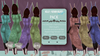
![[MoMu] Kenan/kelly Vulpes Naturals pack](https://slm-assets.secondlife.com/assets/32448792/view_small/Redfox.jpg?1668863583)