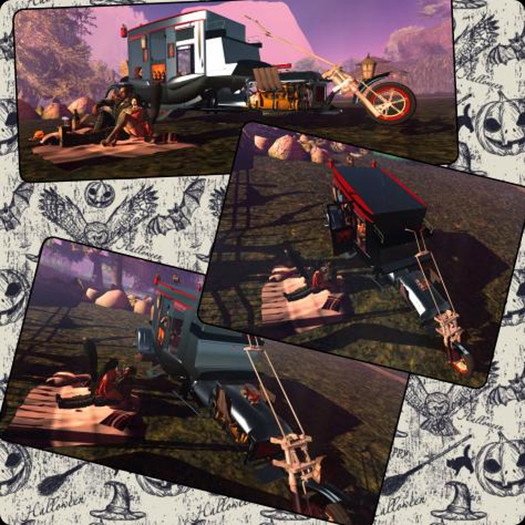


All DRE Motors Bikes Use KCP ACS SCRIPT and Pose menu all are Fully customizable.
This Bike has a half price sale for the Month of October, as part of our Halloween gift.
The Night Fright is a special build for Halloween 2017 from DDC. With custom poses for the driver from Orryx Poses. With Custom sounds for startup and the horn. Contained inside is a candle wick with in the pumpkins that will actually burn. The Candy bucket when clicked will give the person a piece of eatable candy. But the candy could be trick or treat. For the eating animation they may need to turn off their AO. The Vehicle contains 3 passenger seats, that the person can sit on by running their mouse over the seat positions in the back of the carriage. Access the couples menu pose balls by typeing /1 show, and hide them again by typing /1 hide. The couples menu utilizes props function, if you are in a rez area when seated in the first couples seat it will rez a full picnic, for you and your partner to enjoy. Happy Halloween from those of us at DDC.
----------Features of the Bike:-----------------
Clicking on the bike or on HUD will give you the following functions:
Anti-theft System
Ability to drive in mouse-look.
Flight
Manual or automatic gearbox
Re-sizer (Making it bigger or smaller. Convenient!)
Position (Moving your avatar to fit on the bike however you wish.)
Burnout (Scour & Smoke!)
Horn
Lights (Clearly visible when turned on)
Parking (When you get off the bike, it tilts and rest on the stand in a natural way.)
Different set of sounds for the engine based on bike design.
Avatar posture on the bike change automatically depending if it is running or stop or reverse - park
ATTENTION: The different models and avatars, do not always have the same positions! And they may not fit perfectly, but you can always adjust it from the menu.
-------Add in instructions. Extreme Models only:-----------------
To sit on the bike right-click the engine and then sit down,
the passenger can sit by clicking on the seat of the bike.
Use the Shift and Arrow keys left and right, to change the gears it is also possible using the HUD or the menu of the bike
with the Up and Down the Moto rears, in the Options menu you will find other options for sound editing and basic positions when available,
Cuddle Poses- Extreme versions of the Bikes come with full cuddle menus. To work these on the Beast model. One person will right click and sit on the red Curled Horn while a second sits on the Black Straight. This will then put both people in the first position, and give the menu. From this menu you can then switch seat positions so that either avatar is either seat position.
With the extreme versions you now receive three Paint cans with in the box, these allow you to change the look of the bike by changing the pain job. To do this.
Rez a filled paint can next to the vehicle.
From the vehicle Graphics menu choose Paint job, a floating text message "Waiting for Paint job…" will appear over the vehicle in floating text.
Touch the paint can and choose SEND from its pop-up menu.
Wait for paint job to be applied.
Removal of saddle bags, wind screens and Back rests.
Click on the Bike
Navigate to options Fixtures.
Choose the group to hide the items with in that group.
Click the same group name to put them back on.
---------Base INFO Both Standard and extreme-----
Motorcycle Instructions
RIDING
To drive the bike, right click it and select the option from the pie menu.
Use the arrow keys to accelerate, brake, and steer.
To shift gears, press the SHIFT key and the left or right arrow key.
To drive in reverse you will need to select reverse gear
For sharp turns at speed, skid out by pressing the back arrow while turning.
For Nitrous Oxide boost (NOS), press both the up and down arrow keys together.
For wheelie, use the E key (or page up), use C (or page down) to nose down.
Click on the bike for the menu system. From here you can access the customization options and position adjust as well as the lock system and handling options.
To engage FLIGHT mode, press both left and right arrows at the same time!
In flight, use the E key (or page up), use C (or page down) for down.
To use the HUD functions you must be seated on the bike!
Second Life の商品を表示- Vehicle
- Drivers Hud
- Fuel System HUD
- Directions


140 prims
I repeat, this thing is 140 prims.


