


Join the invasion...
See the link below for the video.
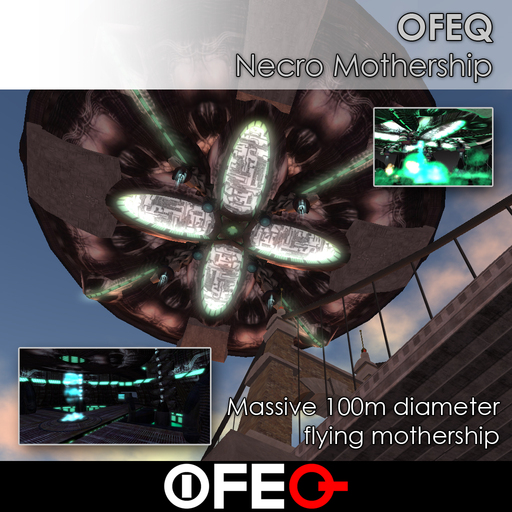
Massive and omnipotent, consisting of 236 prims, spanning roughly 100 meters in diameter, 40 meters high, and it flies.
When you first rez your mothership, it will be approximately 60 meters in the air above you. A teleport beam should appear allowing you, and others, to teleport into the ship. Please be sure to rez the ship on land with scripts turned on, or the ship will not function.
In the center of the ship, on the first floor, you will find the teleporter control panel. Touching this screen will toggle the teleport beams on and off.
On the second floor, in the center, you will find the ship's main control panel. Two screens give access to the ship's main menu, and the claw in the center is used to pilot the ship. Touch one of the screens to bring up the main menu. Select the claw and choose sit to begin piloting the ship. Anyone not seated in one of the ship's pods or not flying will probably fall once you start to fly. When you are piloting the ship, you can click on the top dome to access the main menu. You can also access the menu using the Remote Control HUD.
MAIN CONTROL MENU
Drop Bombs
This will cause the ship to drop Necro bombs down below, creating massive devastation. The explosions will inflict damage where damage is enabled.
Horns
Use the horns to announce your presence and instill fear and awe in the masses below. You can choose the default horn, various notes to play your own tune, or the pre-configured hails. The horns can be quite loud to the people below.
Warp
The ship is capable of jumping altitudes very quickly. Access the warp menu to choose which altitude you wish to warp to almost instantly. Careful when warping while people are standing in your ship, as they will not warp with the ship, but will instead fall. Everyone must be seated somewhere in the ship to warp with the ship. When the ship begins the warp sequence, it will sound an alarm to warn everyone.
Speed
Choose the speed menu to select how fast the ship should travel in meters per second.
Teleporter
This turns on or off the teleport beams. This is an extremely long glowing green beam of light that instantly teleports anyone into the ship that touches the beam. Although the beam is very long, it will only be visible to people, if the beam is within their configured draw distance. If you are unable to see the beam, this is likely the cause. Be sure to go into your Graphics settings in preferences, and increase the draw distance setting.
Also included is the Remote Control HUD attachment. Wear this attachment, and you will be able to control the ship from anywhere within the sim. Be careful not to maneuver the ship into a neighbor region if you are not seated in the ship somewhere. Doing so will cause you to lose communication with the ship once it leaves your current region, and it will most likely not stop moving along the path you sent it on.
You may allow other people to pilot the ship by adding their names to the guests notecard found inside the ship. Simply right click the ship, choose Open, then double click on the guests notecard. Add the guest names to the notecard and hit Save. The mothership will reload its settings, and your new guest should be able to access the ships functions as you do. Also, guests will show up as green markers on the mini radar display in the mothership, across from the main control console.
Careful flying across region borders. SL does not handle region crossings very well, so there's always a chance you will get disconnected, unseated, crash, or any number of unpredictable other things. Even walking from one region to another is not usually very smooth, and vehicles make it worse. Although this ship is capable of crossing sim borders, there's always the chance something bad will happen.
ofeq.org
twitter.com/ofeq
- Monstrously huge and flyable
- Massive bombs
- Doomsday weapon
- Altitude warp
- Remote control HUD


Fun
Fun large and fly’s , for some reason part of the decor is large penis Looing power pods is made d copy no transfers can run by hud or menue and add guest users via note card , teleport sends you to surface level in instead of the end of the beam so u you I’m can’t get back to the ship way with out flying up to the beam, exterior is well done interior is huge roomy but waisted space and textures are old I’m me if you want to see it I’ll Rex it out
Pretty bad
Despite being advertised as such, the ship (that came with the upgrade server) isn't copy inworld at all! Wasted nearly 3,000 LL on this, as I can't fit it inside a rezzer when it's non-copy. Also, the hull textures (top and bottom) are completely screwed up. Not sure what the deal here is, but this was a very bad experience.
Cool very cool a real Internethit!
This thing is fun and absolutely amazing and very cool. The sound is fabalous and the graphics 2.
Note: check the shape of the chairs, turn it upside down ..haha
For now the best UFO I have seen here.
Great, but!
Very impressive ship and love the sounds, but not too many places will let you Rez your ship.
WTF
OMG OMG this is totally amazing. Huge ship so big I couldn't even rezz it on land. Drops bombs awesome scary noises and warp factor 9 Jim :) Totally amazing build.
amazing!
I purchased this a year ago. Found it in inventory. I forgot how awesome it really is! Love it!


