![>:{Kontrol-R}:< [6-VPM] USB](https://slm-assets.secondlife.com/assets/23539063/lightbox/!!_Template2_!!.jpg?1557112356)
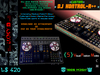
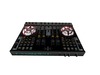
>:{Kontrol-R}:<
Interact with the speakers or mixer to access the VPM "Visual Position Menu." This menu offers various preset positions for your setup, each designed to provide a different visual experience:
:NBG: Background with animation HUD
:BAF: Simple, compact, basic, as [Expletive]
:D-LUX: Screen-Speakers-KOZ
:CUB3: Large Screen-Big Speakers-Cube
:CUB3.2: Large Speakers-Cube-
:Nu-CUB3: Simple CUB3 and Controller
To adjust lighting effects, either tap ON/OFF or press and hold >:{LIGHT-FX}:< to access the ALS "Advanced Lighting Systems" menu. Here, you can customize settings such as intensity, radius, falloff, glow, fullbright, color, alpha, and "Particles."
Additionally, you can touch :{SHINE}: to modify reflection colors, and :{CS COLOR}: to toggle the glowing border on the jog wheels. The screen can be tapped to open the browser, with arrows controlling next/prev animation textures, and you can touch the animated screen to select it. Note that controls function in mouse look mode.
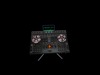
You have the option to either (WEAR/ADD) this setup as an attachment, which attaches to the Avatar Center, or simply rez it on your stage/booth for immediate use. Enjoy this new project! Should you wish to utilize the full model on other platforms, it's available for purchase here:
https://www.cgtrader.com/3d-models/electronics/audio/native-instruments-traktor-controller-lucky-13-custom
- Simple Easy to use
- Low Land Impact
- MANY MANY Features
- Lighting
- Animations


Awesome!
Awesome product and I liked it a lot since I am a DJ SL and I like products like this


