

**Update** 09/04/21: I added a whitelist feature. I tested it a lot but it might still have issues. Please write a Notecard if something is wrong.
====================
Long description
====================
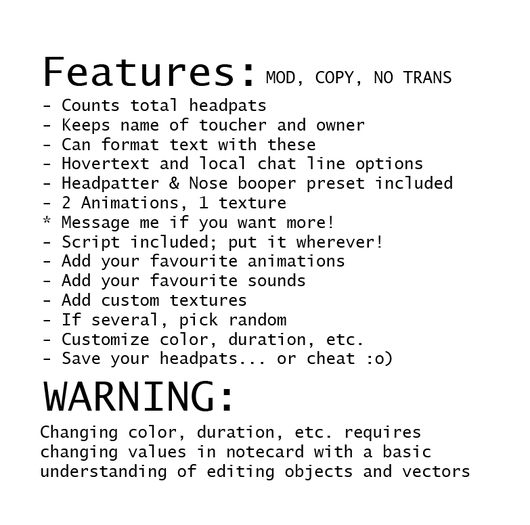
At its core it's pretty much got all the components that every slapper, headpatter, spanker, toucher, whatever does.
It includes presets as a headpatter and nose "booper".
The idea is that the user can pretty much tailor their experience to their specifications without having to script one themselves. Some basic object editing skills are required to make your own!
The product is the script first and foremost, not the stuff included.
==================
FEATURES AND CAVEATS
==================
==General==
+Script has copy permissions, so you can put it in objects of different shapes. You don't have to stick to a sphere.
+Settings are configured via a "Settings" notecard, so you can change multiple things at once without having to go through 20 dialogs.
+Can reset touch count after copying to other prims. Don't worry about accidentally deleting, though. You'll be asked to confirm.
+[NEW] Can now save your count to the object and load it with a newer version of the script!
- Meant to be modified, so it comes only with animations everyone and their mom owns + a heart texture.
- Uses a note card and takes a few seconds to load the settings every time it changes.
+- You can use (no transfer) stuff with it, but you need to rez it first!
!!! IF PARTICLES TAKE TOO LONG TO LOAD, YOU CAN PUT THE TEXTURES ON ONE OR MULTIPLE PRIMS TO PRE-LOAD!
==Toggles==
+It supports sounds, animations, particles (best in form of 128x128 textures).
+Use an ON/OFF toggle for animations, sounds, particles, "RP" chat lines, hovertext, ability to touch yourself.
+Stick to one sound/animation/particle or toggle to randomly choose one of each type per touch.
==Touching & Hovertext==
+Change the duration of particle spam and touching mode.
+Change the titlers text settings:
> Modify the text via newlines, insertion of the owner's name, touch counter and (last) person touching them.
> Change the color of both the titler and the touch titler text using the LSL color scheme (<0, 0, 0> to <1.0, 1.0, 1.0>).
- Hovers over the root object if unlinked, if linked it hovers over the 2nd link.
- Animations, sounds and particles are stopped when the touch duration stops!
- Always chooses the first animation/sound/texture if randomizing is disabled.
==RP Lines a.k.a. local chat spam==
+Set to say, whisper or message only the person in local chat via the object (you won't see the message) when you're touched.
+Supports everything hovertext does except newlines.
+Can support multiple RP lines, also lines starting with /me
+Object's name can be changed for these lines, which can also use the name of the owner or toucher.
- Spamming local chat might annoy people.
- Gets difficult to see if you have many RP lines.
- Messages always cycle from beginning to the end. No randomness.
==Particles==
+ Preconfigured to not look as horrible as 90% of the possible settings combinations
+ You can change important parameters like duration, firing rate, projectile speed, size, count.
+ I included a heart texture!
- Can't change angle or particle type. This has a big impact on the particle itself.
+ I will change it to what you want if you're not satisfied.
- Might need your own textures.
- Textures are always facing up and don't rotate with the force.
==DIY INSTRUCTIONS==
-Positioning!-
If you don't want to lose track of your prim, click Edit > Texture > Set Transparency to 0%. Once you're done, set it back to 100%.
Another option: Press alt+ctrl+T in your viewer to see transparent things.
The prims are modifiable, so you can put the sphere and cube wherever you want.
Make sure to attach the object to the body part you want it to stick to! Otherwise it'll be out of place!
By default, the cube displays the hovertext messages, the sphere is the touch area and source of all effects.
Move those where you want!
IMPORTANT: You can use (no transfer) Animations and Textures with the product! You just need to rez the object before you can add!
-Linking-
This object can be linked, but note that the hovertext will always be on the 2nd link and the effects will play off the root.
When moving the individual parts of the object, always make sure to Edit Linked! The script should be on the root object (link 0 or 1)!
-General-
If you want your own shape:
1. Copy the contents of the object to your new shape.
2. Attach it and position it on your desired body part.
3. Make it transparent.
4. (Optional) Link a second prim that will carry the text.
(PLEASE I WANT TO KEEP A GA RATING)-"Slapper"-
You know what I mean:
1. Turns animations and/or sounds on.
2. Put in a sound and/or animation that'll make a body part jiggle.
3. Disable the hovertext if you don't want it or leave it empty.
4. Whatever else you want, I'm just giving you ideas.


worth it
best head pooter for me :D
Hell ye
Super cute and easy to work with, I appreciate the update of adding a pre-made head patter