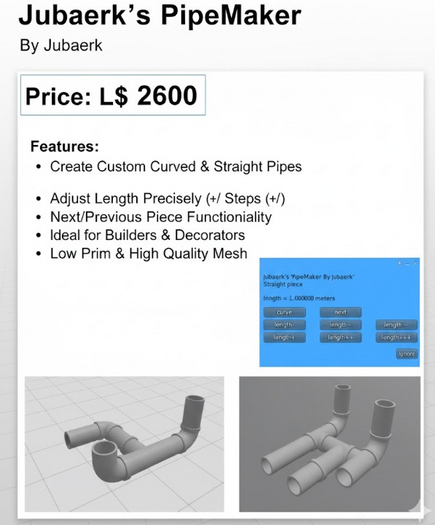


The PipeMaker by Jubaerk is a smart, dialog-driven LSL tool for Second Life creators who love precision, creativity, and freedom in building. Whether you’re crafting industrial networks, intricate piping systems, or abstract art in the sky, PipeMaker takes the headache out of alignment, rotation, and fitting — giving you a clean, continuous pipe layout with perfect joins every time.
At its core, PipeMaker is a self-replicating building assistant. It automatically rezzes new pipe sections that connect seamlessly to the previous one, aligning rotation, scale, and position down to the decimal point. That means no more manual tweaking, no more misaligned joints, and no more gaps or overlaps. Everything fits together as if it were a single, flowing structure.
The script gives you a simple dialog menu that controls every major aspect of your pipe’s shape. You can build straight or curved sections, stretch or shrink lengths, tweak the radius of turns, and set arc and tilt angles with precision. Want a gentle bend? Increase the radius. Need a tight corner? Decrease it. You can even rotate the pipe’s curve up or down to form vertical spirals or complex 3D shapes.
PipeMaker lets you switch between cylinders and torus segments on the fly, combining both shapes to form pipes that twist, turn, and run in any direction you want. When you click the “curve” button, your next segment becomes a torus bend; switch back to “straight,” and you’re back to cylinders. Each segment updates instantly, so you can see your progress as you build.
This isn’t just a visual helper — it’s a precise geometric tool. Every calculation inside PipeMaker ensures that torus arcs, hole sizes, and diameters stay consistent so your pieces connect without visible seams. The system manages rotation offsets, radius compensation, and scale adjustments automatically. In other words, it does the hard math so you can focus on building.
You can control your build interactively using dialog buttons or chat commands. The dialog offers quick presets like “length+” or “arc++” to increase or decrease parameters in fine increments. But for expert users, there’s even manual control via chat commands. Type /1 radius 2.5 or /1 arc 180 to set exact values, or use /1 reset if you want to restart a build from scratch.
The script also supports user-defined scaling and hollowness. If you want hollow pipes, set the hollow parameter in your starting cylinder — PipeMaker will carry that through every new piece you create. You can also resize your pipes at any time, adjusting the diameter or wall thickness for custom looks.
Every new segment is created as a child copy of your original “PipeMaker” object, making it a safe form of self-replication. The setup process is simple:
Create a default cylinder named “PipeMaker.”
Drop the script inside it.
Take a copy and place it inside the rezzed one.
Take that full setup into your inventory — it’s now ready to build.
From there, just rez your PipeMaker, follow the on-screen dialog, and start creating. Each piece you add rezzes perfectly aligned, with a red-highlighted “active” piece showing your current work point. When you’re happy with the design, simply delete the red piece, and your pipe network is complete.
PipeMaker was built for builders, scripters, and creative designers who want full control without endless manual positioning. It’s ideal for building:
Industrial piping systems
Sci-fi corridors or conduit tubes
Decorative curved shapes and spirals
Airflow ducts, tunnels, or underground networks
Custom lettering or names written in prims
For advanced users, every aspect of the code is modifiable. You can edit or extend the script to support new materials, textures, or automated pattern builds. The clean, well-documented structure makes it easy to follow. Every function is designed to be clear, logical, and easy to tweak.
PipeMaker is released under the GNU Public License, so you’re free to modify, share, and redistribute it — just keep the original credit intact. Whether you’re an experienced builder or someone who loves experimenting with creative scripts, this tool gives you the kind of fine-grained control usually reserved for professional modeling software.
The precision of the script is remarkable: the algorithm uses SL’s native primitive parameters like hole_size, cut, and rotation to ensure every new section fits mathematically with the last. That level of accuracy means you can build entire pipe networks hundreds of meters long without ever losing alignment.
Even better, the user interface stays simple and responsive. It doesn’t flood you with unnecessary buttons or text. You get straightforward options, labeled clearly, and all the adjustments happen instantly in-world. There’s no external HUD, no extra attachments — just pure, in-world creative control.
- Dialog-driven interface for quick and easy pipe creation.
- Perfect automatic alignment between curved and straight segments.
- Full manual control via chat commands for precision building.
- Supports scaling, hollowness, and shape switching (cylinder/torus).
- Copy/Mod permissions for customization and learning.