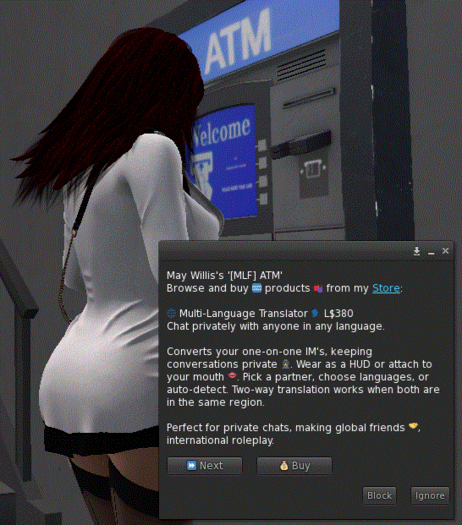


Elevate your in-world sales with this versatile and professional selling system. It allows you to set prices, provide detailed descriptions, and bundle multiple items—including prims, scripts, notecards, textures, and more—into each product. Buyers can browse, select a product, complete payment, and instantly receive all items in their inventory. Creators maintain full control over their sales while presenting their work in a polished and professional manner.
How It Works:
Selling Terminal & Box/Bag
• The system requires two prims: a terminal (ATM or computer) and a box or bag for delivery.
• Buyers browse products at the terminal, and purchased items are delivered via the box or bag.
• Note: The terminal and box/bag are not included with the system and must be provided separately.
AVsitter 2.2 Scripts
• The system integrates with AVsitter 2.2.
• [AV]adjuster, [AV]helper, [AV]prop, [AV]sitA, [AV]sitB → Add these scripts to the terminal prim.
• [AV]object → Add this script to the box/bag prim.
Selling System Scripts
• [AV]atm → Place in the terminal prim.
• [AV]box → Place in the box/bag prim.
Product Items
• All items you wish to sell must be included inside the terminal prim.
Product Configuration
• Product data is stored in the AVpos notecard inside the terminal prim.
• Terminal description is stored in the TEXT record of the notecard.
• Each product’s details are entered in ATM records with the following format: ATM Product Title|Item 1,Item 2|Price|Product Description (max 512 characters)
You are invited to review and assess the functionality and usability of this selling system at my front door. The link is available in the ‘Inworld Store’ section of my Marketplace profile.
