




Thank You for Your Purchase.
Permissions = Modify & Copy
Transfer = NO.
All Parts fully Adjustable.
Build Example included.
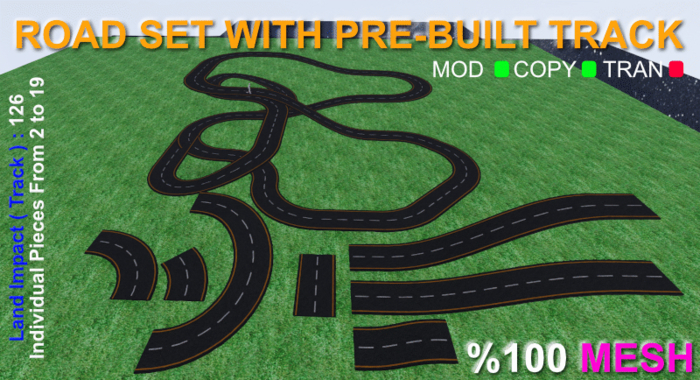
126 Land Impact ( LI ) - More if you make it Bigger in size.
Slightly bigger than 64mt x 64mt ( Meters ).
Track example is in 2 sections, be in edit mode before placing if needed.
Included :
Road Texture
Asphalt Texture
ROAD TYPES : ( LI = Land Impact )
Straight ( 1 LI ) - ( 10mt - Adjustable Length ) ( Un-Check "Stretch Textures" for altering, length, of straight piece. )
Curved ( 5 LI ) - ( 90 Degrees )
Curved ( 1 LI ) - ( 45 Degrees )
Curved Up ( 19 LI ) - ( 180 Degrees ) ( 5 mt up )
Slopes with a Drop of : 2mt ( 5 LI ), 5mt ( 6 LI ), 10mt ( 5 LI ) ( mt= Meters )
Slope Lengths :
10mt
35mt
IMPORTANT INFORMATION FOR :
Adjusting "Length" of Straight Piece :
1. Right Click on the item to Edit.
2. In the Edit Box ( Firestorm Viewer )( Best for Building in 3d ),
Click the "STRETCH TEXTURES" box ( Top Right ) and have, NO, Check Mark ( tick ) in the box, so OFF is what you want.
3. Click "Stretch" in the edit box ( Left Side ), then make as long as you need. ( Maximum 64 Meters ).
4. If you want to alter width or general scale, make sure stretch textures is, ON.
Adjusting Size of Roads :
Click on "Stretch" and use the, White corners on the item, or other coloured stretch boxes, ( blue, green, red )
Make sure "Stretch both Sides" is OFF, unless you need.
Apart from straight road, if altering length, size of other pieces, make sure "Stretch Textures:, is ON, ticked / checkbox.
TEXTURE OVERLAP :
In Secondlife, if two pieces are overlapped, textures will tend to flicker / shimmer.
To avoid this at close distance, lower or raise one of the adjoining pieces a very small amount.
This will stop the flickering at short distance.
PLACING PIECES :
Use the grid included ( in your browser ) for placing pieces.
This is "Snap" in firestorm, top right in edit box.
Click on small arrow next to this and make the Units, 2.0 and also click / check, snap to sub-units.
The Object Tab has, Position, Size, Rotation.
You will want to use the position numbers quite often, either manually or with arrows.
To help using the numbers ( arrows ), place your piece using the grid first.
Other Information :
If you break a piece, get another out,
All Pieces Copyable and Modify.
As Usual, All My products are guaranteed, which includes textures.
If there is any problems with the items, contact me and the item/s will be fixed and a new piece/s sent.
