
G Général

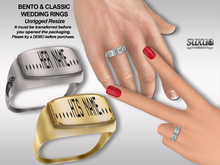
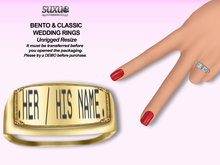
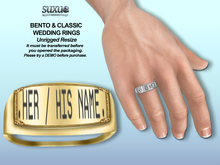
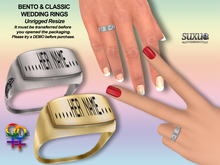
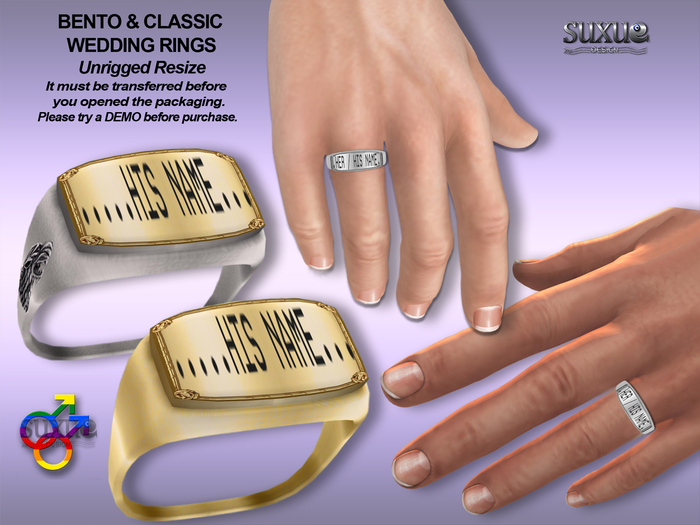
[SuXue Mesh] For Bento & Classic Hands Rings Artu 2 Gays Boxes Version It must be transferred before you opened the packaging

[SuXue Mesh] For Bento & Classic Hands Rings Artu 2 Gays Boxes
Détails
Caractéristiques
Contenu
Avis

Move away from your partner while you're adjusting the hud.

Hello and thank you for choosing [SuXue Mesh] Design.
■■■■■■■■■■■■■■■■■■■■■■■■■■■■■■■■
It must be transferred before you opened the packaging.
If you open your partner's box, you can not send it.
Please do not open to yours partner's box.
It must be send to him or her before you opened the box.
Since the transfer is open, there is “no Redelivery".
■■■■■■■■■■■■■■■■■■■■■■■■■■■■■■■■

Works with or without Bento hands. (Non rigged) Resize.
For Gays 1. Male & 2. Male total 2 boxes (Right & Left rings);

► Please try a FREE DEMO before purchase. Please make sure you are happy with the item before purchase.
► Please make your purchases carefully since no refunds will be given for any reason.
► There is no re-delivery on "transfer open" products.
► No Exchange, No Refund, No Custom order.

Thanks for your understanding.

■Engraving via hud 16 letters.
► How Can I write my Name on a Ring?
➠ Click To Button Letters Numbers Symbol -> 26 Letters little, 26 letters big. Engraving
➠ Write Your Name or Message on Local Chat Window.
➠ Characters:
\"#$%&'()*+,-./0123456789:;<=>?@
ABCDEFGHIJKLMNOPQRSTUVWXYZ[\\]^_`
abcdefghijklmnopqrstuvwxyz{|}~

■ CONTENTS:
► Left & Right rings
8 bento unrigged rings
8 classic rings
► HUD
► Marriage proposal pose animate
► 3 sizing height
► Notecard
► Picture - illustrations (It must be transferred before you opened the packaging!)

■ PERMISSION;
► TEXTURE CHANGER [HUD]
► Low lag (only 1 resizer script)
► Before the box is not open; ̶C̶o̶p̶y̶ ̶M̶o̶d̶i̶f̶y̶ Transfer✔
► After opening the box; M̶o̶d̶i̶f̶y̶ ̶T̶r̶a̶n̶s̶f̶e̶r̶ Copy ✔

■ DESCRIPTION;
► Fat Pack
► 100% Mesh
► [HUD]: Various options.
➠ Silver & Gold 12 keys
► Full Bright on / off key

HUD:
The [HUD] menu is very easy to use. Simply ADD the [HUD] and then the items, and click on your combination of textures

RESIZE:
The resize menu is very easy to use. Just click on the item and a menu will pop-up. Then you can adjust the size of your items.
You can resize your objects (prim or linkset) in all X, Y, Z directions instead of just enlarging them. The menu gives you the possibility to stretch the object in X, Y, Z or XY, XZ, YZ or XYZ directions.
√ That "Stretch XYZ" button works as a clasic prim or linkset resizer.
√ Everytime you can back to store (orginal) sizes
√ You can use it as a posing stand - when the object atached pose on and pose off buttons adds automaticliy but if the object rezzed on the floor that buttons removes from menu -
√ Also deletable if needed.

■ STORE POLICY:
➠ No Custom order
➠ No Exchange
➠ No Refund

PS: Please keep in mind that HUD's do not work in no-script zones.
So if you're unable to control your HUD, this is probably the reason.

[SuXue Mesh] Design

Voir l'article dans Second Life
  • 100% Mesh Bento Unrigged
  • Texture Changer HUD
  • Valentine's Day Halloween happy holiday holidays gift
  • Warrior warriors man men male prince king biker punk gay gay
  • Wedding Engagement Promise Ceremony Valentine Christmas Anniversary Birthday