

If you Like the Item Please give us 1 minute of your time to Review it. Thanxxx :)
Photography Studio Photo Studio
The Classic Photo Studio By Ronski Braess
that has been soled more then 1,000 Times
is now updated and renewd
The professional Photography Studio
trying to get professional product pictures to put on the Market Place?
trying to take a normal looking profile picture?
did you made a great looking outfit but the picture you get is to ugly to upload to xstreet?
STOP trying!!!!!
with this Photography Studio you will be few steps up in your product quality
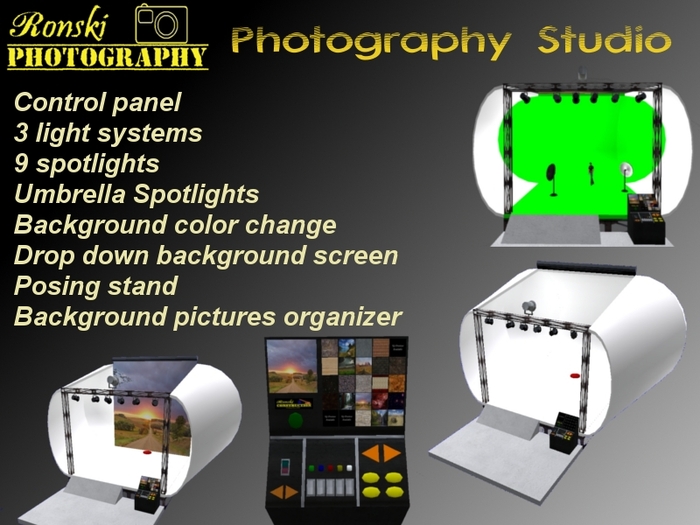
what you have in the Photography Studio:
* A control panel
* 3 different lightning systems with more then 9 spotlights and Umbrella Spotlights
blue, yellow, green, red and 2 white spotlights that you can Individualy control
plus the main spotlight where you can control the lightsource (color, intensity, radius, falloff)
* an easy background picture change based on a Texture organizer
(comes with background textures)
you can add your own of course
* background color change by one word command
* drop down background screen
* posing stand (comes with 30 model animations)
and you can add your own poses and animations
Texture organizer
--------------------------
is a free addition to the Photography Studio, the texture organizer scripts were made by Liandra Ceawlin
the texture organizer is used in this studio to quickly change the background picture without any editing of prims.
Basic Usage:
to use the background screen simple click on it ( the rolled thingy up ther) and it will drop down
To choose a category of textures, simply touch one of the oval yellow buttons.
A (partial) group ot thumbnails of the textures in that category will appear.
To see the rest of the textures in that category, use the Prev and Next orange arrows to move between pages.
To preview a texture, touch the thumbnail on the left. The texture will appear on the large screen.
To get a copy of the texture to use in your builds, simply touch the large screen and it will be delivered to your inventory.
Adding your own textures:
At some point in your building career, you'll probably want to add your own textures to the organizer.
You can add your own textures by dropping them into the category buttons (by selecting them in Edit Linked Parts mode).
To change a category name, edit the description of the button (in Edit Linked Parts mode).
Make sure that you delete the old copy from your inventory and pick up the new copy that you've added the textures to. However, you may with to keep an empty copy handy to give to your friends and acquaintances as well. :)
For the textures to work correctly in the organizer, they must have full permissions.
Lights
------------
you have 3 options for lightning in this studio
1. the main spotlight:
simple click on the big spotlight and you will get a drop menu.
2. color spothlights:
to use them just use the buttons in the center of the control panel,
ther are 4 light color to chose from and you can turn on them all to get a special ligth effects.
3. Umbrella Spotlight:
you can put it wherever you want to get the perfect light on your model or object.
to turn it on and off click the back silver side of the spotlight
Posing stand
---------------------
to use the posing stand simple sit on it.
to add your own animations just edit it in linked parts and drop your animations inside.
to make it unvisble hit the green\red button on the left side of the control panel.
use the Prev and Next orange arrows to move between animations.
Background color
---------------------------
to change the background color simple type the color name in public chat.
list of colors:
black
white
grey
light grey
dark red
red
light yellow
yellowif
dark yellow"
light green
green
dark green
light turquoise
turquoise
dark turquoise
light blue
blue
dark blue
light purple
purple
dark purple
orange
brown
pink
dark pink


