
詳細
設備
コンテンツ
レビュー
SCS SCRIPT
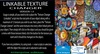
TEXTURE CHANGER ( 12 textures)
Usage is simple, all you need to do is place the "Texture Changer (Linkable)" script into the root prim of your object along with a maximum of 12 textures you wish to use. Next, place the "Texture Changer Listener" and the same textures into every other linked prim on your object. Then simply left click on the object and you should be given a menu with those textures listed, click the button for the texture you want and it should be changed on the object.
