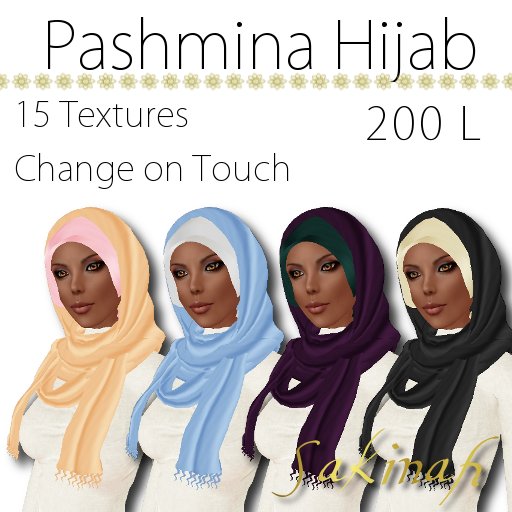

Part of pulling off my Modest yet Modern look in SL, I LIKE wearing things made by other designers. There's some fabulous stuff out there! But it's hard to keep up with the latest trends when you don't have a hijab to match your awesome outfits. A huge part of the fun of not only SL, but of fashion in general is getting to be creative, mixing and matching things to get the look you want, that's unique to you. So, I present a line of Hijabs designed to give you the flexibility to be creative with your look while still maintaining your modesty.
There are 15 textures built into the Hijab which comes in two parts. First there's the Drape, which attaches to your chest. Then there is the Hood, which attaches to your skull.
Attach both pieces and left click on your head. It's that simple! A blue menu will pop up in the upper right of your screen asking if you'd like to change the "Scarf" or the "Underscarf".
Fashionista Hijabis often wear two or more scarves to create a contrasting color look to coordinate with their outfits. This build is designed to mimic that, with the prims closest to your face being the "Underscarf". You can change them independent of the rest of the Hijab, so you can mix and match the different textures to get different looks!
Once you've chosen which portion of your hijab you want to change, another blue menu will pop up and list the texture options available. Choose the one that best suits your look, and there you go!
The Script is keyed to the owner, so if there's more than one of you in chat range wearing them, only yours will change.
The Hijab (Head Part) is the controller. The script will not work to change just the chest attachment of your Hijab. You can, put on the Hijab and scarf, change the textures and remove the head attachment if you like.
The script, hijab, and textures are all designed to be very low lag, so it will work perfectly in the most crowded places. I've tested this, going to some of the most laggy script heavy places I know in SL with lots of avatars around. (Few things lag your machine like other avatars) It's worked quickly and perfectly everywhere. Both pieces of of Hijab have an "Avatar Rendering Cost" of around 80. Avatar Rendering Cost is the amount of memory it takes someone's machine to load your avatar. The lower the number the better! To give you an idea of how low lag this is, An average prim hairstyle has an ARC of around 800-3000.
If the sculpts look funky on your machine, there's a great fix for that too. Type Ctrl-Alt-D to pull up you advanced menu at the top of your screen. Click on the word "Advanced" and look for "Debug Settings" Click on that and in the box that appears at the bottom left of your screen type in "RenderVolumeLOD" There shoudl be a number below that pops up. Default in SL is something rdiculously low like 1.125. Change this 5.00 and Sculpts will not distort at average camera distance.


Just Awesome...
I love this product it has a lot of different colours to make hundred of combinations!
Thanx, it's just awesome, I'm very happy with it! =)