
¸.•´´¯`•´ •.¸¸.•´´¯`••
■▀████■rWarder Ready■████▀■
¸.•´´¯`•´ •.¸¸.•´´¯`••
This product works with rWarder System!
Leave a review on this item and get your reward in the mainstore inworld! (*)
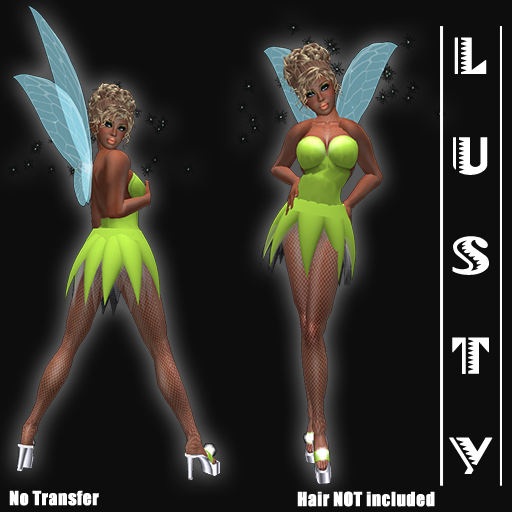
Sexy Fairy
Including Pumps with Sound & Sexy Walk!
Including Wings & Fairydust!
=============================================
This package contains:
Clothing Items:
- Sexy Fairy Top (copy)
- Sexy Fairy Fishnet Stockings part 1 (copy)
- Sexy Fairy Fishnet Stockings part 2 (copy)
- Sexy Fairy Undies (copy)
- Sexy Fairy Footshape (copy)
Prim items:
- Sexy Fairy Flexie Skirt (modify©)
- Sexy Fairy Flexie Skirt/Stripable (prim-modify©)
- Sexy Fairy Flexie Wings (copy)
- Sexy Fairy Dust (copy)
- Sexy Fairy Pumps with Walking Sound:
- Pump Left (copy)
- Pump Right (copy)
Click on the left shoe for the sound Menu.
Click on one of the boots for the Menu.
-Toggle Walk On/Off
-Toggle Sound On/Off
-Set Volume
*****************************************************************************
IMPORTANT
ALL Lusty-items are No Transfer so there are No Refunds or Exchanges possible!
Lusty does NOT sale transferable items.
*****************************************************************************
If you did not receive the folder, or accidentally clicked "decline", or accidentally paid double, there are two things you can do. Email us, or submit a support ticket on our website. Please follow one of the options below to give you the right support a.s.a.p.
SUBMIT A TICKET ON OUR WEBSITE
-------------------------------
1. Go to www.secondlife.com and login with your avatar name and password.
2. Click on "Account", and then click on "Transaction History".
3. Copy your payment with transactions number and details. (CTRL+C)
4. Go to our support site http://www.lustycreations.com/support-center/
5. Click on "Open a Ticket".
6. Paste the details in the ticket (CTRL+V), and add extra information if necessary.
7. Fill in your SL first and last name (if you have no last name, use "resident") in the fields below the ticket and hit the "send ticket" button.
SENDING AN EMAIL
---------------------------
1. Go to www.secondlife.com and login with your avatar name and password.
2. Click on "Account", and then click on "Transaction History".
3. Copy your payment with transactions number and details. (CTRL+C)
4. Paste it a new email-message (CTRL+V), and add extra information if necessary.
5. Send it to info@lustycreations.com with the following subject:
"Item Not Received Lusty - Your Avatar name".
For Example: Item Not Received Lusty - Jane Doe
(*) How does rWarder work?
Leave a review on this product, and come visit the mainstore of Lusty. You will find a rWarder terminal.
Click on it, and type in local chat the product name.The terminal will send you L$ or a gift as a reward!!
- Including Wings
- Including Fairy Dust
- Sculpted Pumps with Walking Sound
