
¸.•´´¯`•´ •.¸¸.•´´¯`••
■▀████■rWarder Ready■████▀■
¸.•´´¯`•´ •.¸¸.•´´¯`••
This product works with rWarder System!
Leave a review on this item and get your reward in the mainstore inworld! (*)
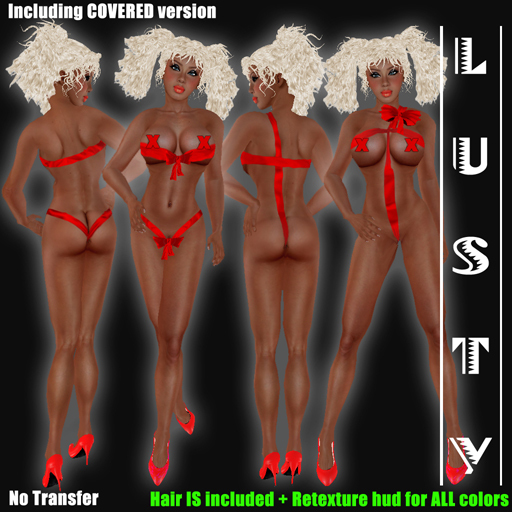
Sexy Valentine Gift
Including Hair + Retexture & Resize Hud to create all colors
=============================================
This package contains:
Clothing Items:
- Sexy Valentine Gift version 1 top (Shirt Layer)
- Sexy Valentine Gift version 2 top (Shirt Layer)
- Sexy Valentine Gift version 1 undies (Pants Layer)
- Sexy Valentine Gift version 2 undies (Pants Layer)
- Sexy Valentine Gift version 1 top (Undershirt Layer)
- Sexy Valentine Gift version 2 top (Undershirt Layer)
- Sexy Valentine Gift version 1 undies (Underpants Layer)
- Sexy Valentine Gift version 2 undies (Underpants Layer)
- Sexy Valentine Gift version 1 top with bare "headlights" (Shirt Layer)
- Sexy Valentine Gift version 2 top with bare "headlights" (Shirt Layer)
- Sexy Valentine Gift version 1 top with bare "headlights" (Undershirt Layer)
- Sexy Valentine Gift version 2 top with bare "headlights" (Undershirt Layer)
- Sexy Valentine Gift Shoes (shoe layer) (no modify, you foot size need to be 0)
- Sexy Valentine Gift Alpha (alpha layer) (works only with viewers who use SL viewer 2 as base)
Prim items:
- Valentine Hair
- Sexy Valentine Gift Pump L
- Sexy Valentine Gift Pump R
- Sexy Valentine Gift Bow version 2
- Sexy Valentine Gift Bow version 2 bare "headlights"
- Sexy Valentine Gift Bow cross undies version 2
- Lusty Hair Recolor/Retexture/Resize HUD
- Naughty Valentine Gift Bow shoulder version 1
*****************************************************************************
IMPORTANT
ALL Lusty-items are No Transfer so there are No Refunds or Exchanges possible!
Lusty does NOT sale transferable items.
*****************************************************************************
How to use the Recolor/Retexture/Resize HUD
--------------------------------------------------------------
1. Wear your hair
2. Wear the Lusty Hair Recolor/Retexture/Resize HUD
3. Wait until all is loaded
4. choose the given options on the left side panel (hair for this design)
5. See the tabs above for more additional choices
6. De-attach the hud when you are done.
Re-attach the hud for remodeling again, or touch the hair to get a more simpler sl-menu
If you want to remove the scripts after you are done to avoid lag, please make a copy or your hair first before doing so. This way you always have a scripted version in your inventory when you in the future decide to change size, color or texture.
FYI The hud also give you the opportunity to change the size of your hair. But the hair is ALSO manual modifiable. So you have total freedom to adjust every single prim as well in edit mode!
--------------------------------------------------------------
If you did not receive the folder, or accidentally clicked "decline", or accidentally paid double, there are two things you can do. Email us, or submit a support ticket on our website. Please follow one of the options below to give you the right support a.s.a.p.
SUBMIT A TICKET ON OUR WEBSITE
-------------------------------
1. Go to www.secondlife.com and login with your avatar name and password.
2. Click on "Account", and then click on "Transaction History".
3. Copy your payment with transactions number and details. (CTRL+C)
4. Go to our support site http://www.lustycreations.com/support-center/
5. Click on "Open a Ticket".
6. Paste the details in the ticket (CTRL+V), and add extra information if necessary.
7. Fill in your SL first and last name (if you have no last name, use "resident") in the fields below the ticket and hit the "send ticket" button.
SENDING AN EMAIL
---------------------------
1. Go to www.secondlife.com and login with your avatar name and password.
2. Click on "Account", and then click on "Transaction History".
3. Copy your payment with transactions number and details. (CTRL+C)
4. Paste it a new email-message (CTRL+V), and add extra information if necessary.
5. Send it to info@lustycreations.com with the following subject:
"Item Not Received Lusty - Your Avatar name".
For Example: Item Not Received Lusty - Jane Doe
(*) How does rWarder work?
Leave a review on this product, and come visit the mainstore of Lusty. You will find a rWarder terminal.
Click on it, and type in local chat the product name.The terminal will send you L$ or a gift as a reward!!


