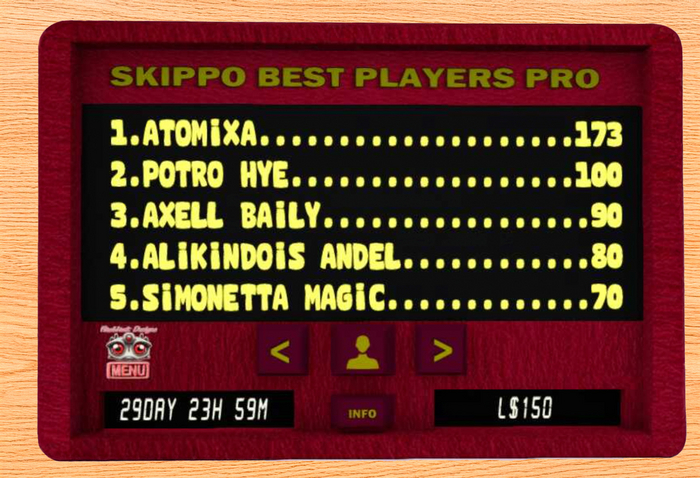
With this board you can keep track of scores of the Skippo game (Brock games version) and also you can pay prizes to game winners.
It has the following features:
- Handles any amount of tables.
- Players can locate their position in the board.
- Doesn't lose scores when taken to inventory.
- Multi-page for store player names and scores (using arrows for next and previous page).
- 5 text lines per page.
- Can backup / restore player names and scores using notecards
Prizes
-------
This board have the option of offer game prizes in L$ for your players. You can choose different modes:
TIME: prizes are given after a certain amount of days. You can choose a minimum number of games to reach to pay prices.
GAMES: prizes are given after a certain amount of registered games.
NONE: no prizes, only register winners in the board.
You have other options, like setup pot amounts for until 5 winners and option the stop the board after a certain amount of L$ is payed (STOPLOSS)
This is done writing your configuration in the '_config' notecard, The initial content of this notecard is the following;
>>>>>>>>>>>>>>>>>>>>>>>>>>>>>>>>>>>>>>>>>
# mode for prizes can be TIME (days) , GAMES (number of games), or NONE
mode = TIME
# modevalue: number of games or time in days
modevalue = 30
# stop when limit is reached
stoploss = 200
# minimun number of games to get paid in TIME mode
minimun = 30
# pay notifications to owner
notify = 1
# Pot for each prize slot
pot1 = 100
pot2 = 50
pot3 = 0
pot4 = 0
pot5 = 0
>>>>>>>>>>>>>>>>>>>>>>>>>>>>>>>>>>>>>>>>>
Operation
------------
- The object owner must rez the board and click over it.
- Associate a game table with the board: click menu, option [Manage] / [Skippo+]. Input the game table object UUID in the text box or press [Scan] for pick nearby object names from menu.
- You can associate some game tables to the same board.
- Options are provided for switch off / on the board.
- With the [Manage] menu option you can add, remove or list the Skippo games associated to the board.
- With the [Event] menu you can kill the current event.
- With the [Stats] menu you can see the amount of registered games and total money payed.
- For create a backup of current games, press [Manage][Dump] menu and copy game output text to a notecard called 'dump'. For restore data, load the 'dump' notecard in object inventory and press menu [Load dump]
Have fun !
- Flashback Designs -
- Handles any amount of tables
- Players can locate their position in the board
- Give prizes in L$
- Multi-page for store player names (using arrows for next and previous page).
- Can backup / restore player names using notecards
