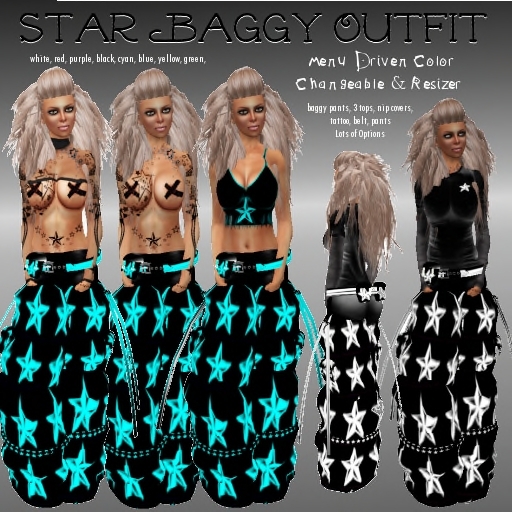

Star Baggy Outfit for females by Cherry Bomb
Menu Driven Color Changeable & Resizer
baggy pants
3 tops - (to change top's color you must go into appearance)
nip covers
tattoo
belt
pants for under baggies
lots of different options
(colors: white, red, purple,black, cyan,blue,yellow,green)
Also Check Out Star Baggy Outfit- Male version here! For matching couples outfits!
Resizer info:
Simply wear the object
Ok now touch the object.. Remember if you want to alter a single prim, please touch the apropriate one. Below will follow all the options you will have and what they are for.
==== FUNCTIONS ====
After touching a prim you will get the question, This prim or All prims. Easy right. Do you want to modify this child prim only or the whole object.
This Prim->Scale +1% This will increase this single prim in size by 1%
This Prim->Scale -1% This will decrease this single prim in size by 1%
This Prim->Revert If you made a little mistake on this single prim, this will revert it back to the settings you bought your object with.
This Prim->Show prim Blinks the prim you are about to alter a few times (nice to make sure its the correct one)
This Prim->Rotation Gives you a menu to alter the child prims x,y and z rotation
This Prim->Move Gives you a menu to alter the child prims x,y and z position
All Prims->Pose->Start Well, this allows you to strike the same pose you would normally be in when editing appearance. Quite usefull to keep standing still without the use of a pose stand.
All Prims->Pose->Stop Tired of standing still after pressing start? This will snap you back out of the pose.
All Prims->Restore->Store This will revert all changes since the item changed owner.
All Prims->Restore->Last Rez This will revert all changes since the item was last rezzed or worn.
All Prims->Delete This will remove al scripts from the item that are used for this tool. Remember if you do this you will not be able to modify it anymore (so be sure to make a copy first if possible). Why would you want to use this then? Lag... All scripts use up sim resources, if you remove the scripts, the sim will lag less.
All Prims->Scale +1%/Scale +5%/Scale +10% These will increase the total size of the object by 1 5 or 10%
All Prims->Scale -1%/Scale -5%/ Scale -10% These will decrease the total size of the object by 1 5 or 10 %
Check out:
Cherry Bomb Main Store in World!


