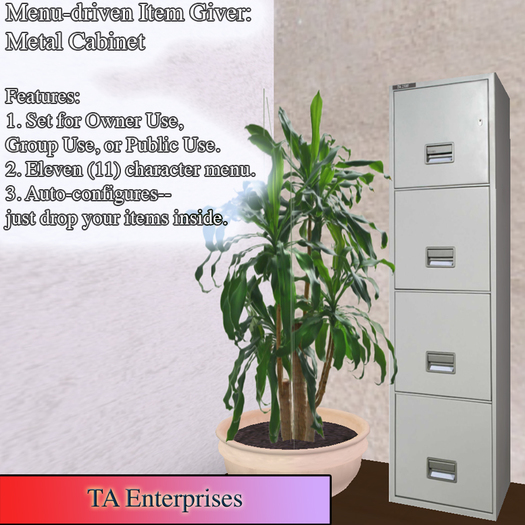


<TA>Menu-driven Item Giver: Metal Cabinet
Would you like a way for members of your group to have access to vital items without your having to always be around to give them out?
How nice would it be if guests to your venue could get the items they want, at will, and without them being hassled by automated greeters?
<TA Enterprises> needed just such a thing for our team, so we built one (after finding a great script for sale) that does all that.
You simply put things in it, set the permissions, and go!
POSSIBLE USES
1. Distribute items to members of a group.
-- Group gifts.
-- Team notes, equipment, etc.
-- Promotional items.
2. Distribute items to the public.
-- Landmarks
-- Venue rules
-- Policies and procedures (dancers, DJs, hosts, etc.)
-- Promotional items (shirts, hats, etc.)
-- Club gestures
-- Other notecards
We are using it to make sure that all the team members have access to tools and key components. We put a version of this in our team headquarters, so that everyone can get access to what they need without depending on other team members being on line.
In the future, if we ever run another venue, all our guest relations items will be handled by this system. That is a certainty!
Features:
1. Using the "Permissions" button, the OWNER (and only the owner) can set it to give contents to:
-- Owner Use: Only owner can get things.
-- Group Use: Only members of the group to which it belongs (Set this in the "General" tab of the Edit interface.)
-- Public Use: Anyone can access the menu.
2. Twelve (11) character menu allows room for some-what meaningful options. The menu options are taken from the item name of the things put inside.
3. Auto-configures--just drop your items inside and it sets everything up.
4. Versatile! Many applications!
Instructions:
1. Set your group to what is needed to rez in your location.
2. Rez object.
3. Select the object and pick "Edit."
#####################################
#### If you are going to use the "Group Use" mode: ####
A. Locate the "Group" setting on the "General" tab of the Edit Interface
B. If the group is set differently from the group you wish to have access, click the button that allows you to "Choose a group to share this objects permissions" (or something like that). In Firestorm, it is a wrench to the right of the team name.
C. Pick the group whose members will have access to the contents.
#####################################
4. Go to the "Content" tab of the Edit interface.
5. Drag the objects you want to give away there. Check the names. The first 11 characters and spaces will appear in the menu.
6. Close the Edit interface.
7. Click on the object. The menu will appear with all the things you have added.
8. You can add more objects at any time.
OPTIONAL
You can edit the message of the Optional Hover Text script (it has instructions and it is pretty easy) and add it to the the item so that it will hover text with invitation to people to interact with it. It is named "zzOptionalHoverText" so it will appear at the end of the menu.
MODIFICATIONS
1. You should be able to change the texture of the object. The "No Modify" permission appears because the object inherits the permission of things inside, particularly the script.
###############################
About <TA Enterprises>
We strive to provide fun, affordable options to help you more fully enjoy life on the grid!
Over they years, we have created various items and assembled various collections that we believe are worth sharing. We take extra care to look at details and quality, and will offer only those things that many people will find satisfactory and enjoyable. (We use, wear, (or once wore) the things we sell!)
We hope you enjoy them!
<TA Enterprises> was founded over a decade ago by Trace Avon and Tess Auroline. Some time later, Allie Takeda come aboard to manage the MarketPlace presence. Over the years, <TA Enterprises> has included a variety of different functions including photography services, DJ services, property management, venue operations, fashion sales, scripting, and a few other things.
Check out our MarketPlace store for inexpensive fashions, scripts, gadgets, and furnishings,
https://marketplace.secondlife.com/stores/169255
===================================================
Join our TA Enterprises Group for occasional updates!
Copy this link into Chat, press enter, then click on the link in the chat window:
secondlife:///app/group/fba63207-c0a3-5eb3-dba3-e8d7675e9fa6/about
===================================================
- Set for Owner Use, Group Use, or Public Use.
- Eleven (11) character menu.
- Auto-configures-- just drop your items inside.
- Many uses! Versatile and flexible!


