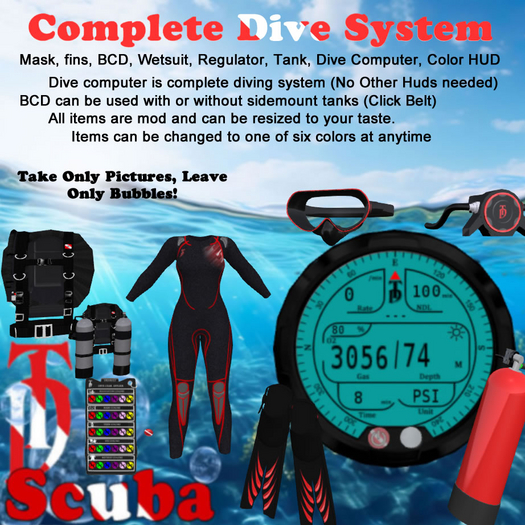

TD Scuba Gear set with Advanced Dive System
Complete diving system for second life! Including mask, fins, regulator, scuba tank wetsuit, computer/dive system with on the fly color changes using the applier HUD! See system options below.
Instructions
**Disable any AO's or dive animations may not play properly**
Option Buttons:
Defaults: (21%, Dual tank, Feet, PSI, Fast swim speed, full bright display)
Gas - Changes the current gas mixture. (Can be changed at anytime, including during deco stop.) (replenishes air during deco stops - new cylinder)
Buoy - Deploys a Diver Down Safety Buoy at your location. (International and US flags included)
Planner - Attaches or detaches up the dive planner / deco time calculator
Brightness - Sets the computer display brightness.
Tanks - Sets configuration for air consumption (dual tanks/single tank) (single tank runs out twice as fast)
Units - Sets measurement units for air pressure and depth
Speeds - Changes the swim speed of the dive system
Reset - Resets the entire dive system.
Help - Gives this notecard and or shows the "SL" deco time chart (based on dive computer algorithm)
Computer Display Info:
Ascend / Descend Rate
NDL Countdown (No Decompression Limit - Deco stop required once counter hits zero)
Deco time countdown. (amount of time you must stay at deco stop level to clear obligation)
Current gas (Selected gas mixture - Air - 21%, EAN 32%, EAN 50%, EAN 80%) *EAN - Enriched Air Nitrox
Compass - outer ring of computer display
Depth ( How deep you currently are)
Land / Water Indicators (Tells the computer and you if the comp is under water or above)
**DECO** - deco obligation accrued icon
Dive Time Counter (tracks the amount of time you have been diving)
Air level indicator (Yep! it's how much air you have in your tank(s))
The computer calculates everything in real time, so no input is required of you other than selecting your gas, powering on the system and going for a dive!
HINT* The dive planner is just a tool to help you plan your dive and figure out the best gas for shortest deco times.
HINT* NDL is the important number, if you don't want to get into a decompression dive! NDL number getting low? Try Ascending a bit and watch the precious minutes return.
HINT* Deco stop time way too long? Try switching to a higher O2 content gas during your stop and watch the counter drop like a brick!
Controls:
W - Swim Forward
A - Strafe Left (1st person) or turn left (3rd Person)
D - Strafe Right (1st person) or turn Right (3rd Person)
Mouse - Steering (1st Person)
PgUp or E - Ascend
PgDn or C - Descend
Remember:
“Every dive is a new adventure” – Philippe Cousteau Jr.
Happy Diving!
TD
**Disclaimer**
Even thought this system functions very similarly to a real dive computer, the calculations should never be used in real life in any way. These are simulated algorithms for role play use in Second Life only.
- Custom fit wetsuits for mesh Avatar bodies
- Mask, fins, regulator and scuba tank - Color change HUD
- Buoyancy Control Device
- Advanced Dive Computer / Dive System
- Sim Cross Stable! No sinking when crossing!


is ok
hope make more stuff like fullface mask etc