

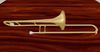

There are two trombones for smaller and larger users. Use the one that fits you best and adjust its position on a slow animation using the Edit tool.
The trombone is held in the left hand.
A menu should pop up when you attach it. Some viewers will let you minimize a menu to a button that you can open again later (Firestorm does). Some viewers don't offer that feature (Singularity). If you close the menu and want a button to get it back, the trombone pack also has a HUD that you can touch to get a menu again. It behaves slightly differently, but you will get the idea as you use it.
There are 11 animations and Stop.
It is a good idea to use a menu to STOP your animations before removing the trombone. If you use the HUD menu, detaching the trombone will not stop your animation, so use a STOP button.
Sometimes lag can cause the animations to not load in the proper order - in that case, please pick the animation button again.
The trombones are 1 prim and 1 land impact as they come.
They are modify so you can re-size them if needed.
They are copy so you can backup the originals.
Included in the folder are two animations to only hold the instrument without moving you. To use those, open the animation while holding the instrument and play the animation in world. This is powerful for times when you wish to stand or walk or sit.
See it in action: https://gyazo.com/b8f6cd4ecf875ac7c386aaac36236283
View Video »- Low prim and impact
- High detail
- Menu of animations
- Two sizes plus resizeable
- Optional HUD to get menu at any time


