
In store summer sale, everything 50% off! Techno Office HQ - Sale prices available through Xstreet too!
Thank You! for considering the Techno Office Five Employee Kit
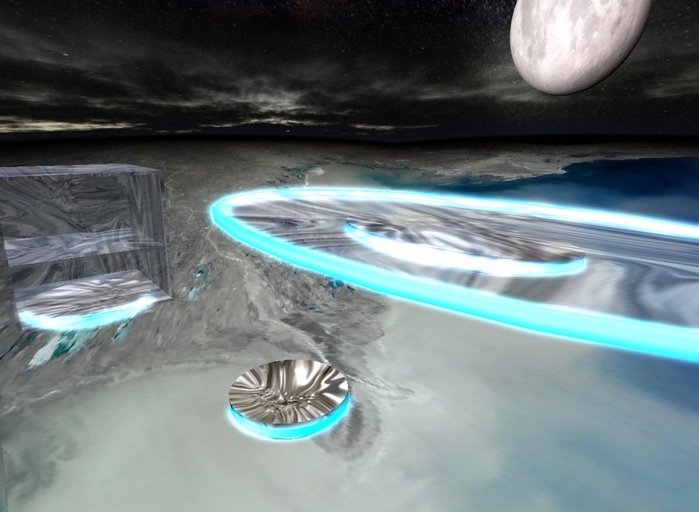
Techno Office series - Low-Prim - Gravitic Powered Office Furniture
The complete line of Techno Office Furniture includes gravitic chairs, desks, tables, and storage units.
See and purchase these items in-world at Techno Office HQ: http://slurl.com/secondlife/Tussock/209/68/650/
This kit is ideal for a small office or group of employees. It contains an unlimited number of chairs and storage units, 1 conference table, and 5 Single Employee Kits, each of which contain one chair, one desk, and one storage unit with optional shelf. All items were designed with low prim count and low lag in mind. They contain no scripts and do not use sculpted textures.
The blue rings on the objects have a subtle glow effect. All objects are modifiable, and the instructions include directions on how to set up the objects for ideal appearance, and tips on how to tint the object.
Packing List:
One (1) Techno Chair - metal, 0.5 meters, circular (2 prims) - Copy, Modify, No Transfer
One (1) Techno Storage - glass, 1 meter, cube (4 prims) - Copy, Modify, No Transfer
One (1) Techno Storage Shelf - glass, .95 meters, square (1 prim) - Copy, Modify, No Transfer
One (1) Techno Table - metal, 6 meters, circular (4 prims) - No Copy, Modify, Transfer
Five (5) Single Employee Kits
Single Employee Kit:
One (1) Techno Chair - metal, 0.5 meters, circular (2 prims) - No Copy, Modify, Transfer
One (1) Techno Desk - glass, 4x2 meters, oval (4 prims) - No Copy, Modify, Transfer
One (1) Techno Storage - glass, 1 meter, cube (4 prims) - No Copy, Modify, Transfer
One (1) Techno Storage Shelf - glass, .95 meters, square (1 prim) - No Copy, Modify, Transfer
Included free for your convenience in this package:
One (1) Techno Office Textures Pack - Copy, Modify, Transfer
Contains 3 textures.
Techno Office Five Employee Kit - Introduction (you are reading it now)
Techno Office Five Employee Kit - Instruction Manual
---
Instruction Manual:
---
Thank You! for selecting the Techno Office Five Employee Kit
Techno Office series - Low-Prim - Gravitic Powered Office Furniture
The complete line of Techno Office Furniture includes gravitic chairs, desks, tables, and storage units.
Packing List:
One (1) Techno Chair - metal, 0.5 meters, circular (2 prims) - Copy, Modify, No Transfer
One (1) Techno Storage - glass, 1 meter, cube (4 prims) - Copy, Modify, No Transfer
One (1) Techno Storage Shelf - glass, .95 meters, square (1 prim) - Copy, Modify, No Transfer
One (1) Techno Table - metal, 6 meters, circular (4 prims) - No Copy, Modify, Transfer
Five (5) Single Employee Kits
Single Employee Kit:
One (1) Techno Chair - metal, 0.5 meters, circular (2 prims) - No Copy, Modify, Transfer
One (1) Techno Desk - glass, 4x2 meters, oval (4 prims) - No Copy, Modify, Transfer
One (1) Techno Storage - glass, 1 meter, cube (4 prims) - No Copy, Modify, Transfer
One (1) Techno Storage Shelf - glass, .95 meters, square (1 prim) - No Copy, Modify, Transfer
Included free for your convenience:
One (1) Techno Office Textures Pack - Copy, Modify, Transfer
Contains 3 textures.
Techno Office Five Employee Kit - Introduction
Techno Office Five Employee Kit - Instruction Manual (you are reading it now)
How to use:
Quickstart:
When placing the furniture, first rez it, and then edit it to adjust it's height. It's easiest to place chairs first, adjust the chair height as described below, and then place tables and desks.
Detailed Instructions:
For Chairs:
1: 'Rez' the chair: Drag the chair out of your inventory on to the ground in your office.
2: Sit on it: Move the mouse cursor over the chair and left click on it, once the cursor changes to a chair pointer, or, right click on the chair and select "Sit Here"
3: Adjust the chair's height: Go into build mode by right clicking on the chair and selecting "Edit", then click and drag up on the blue arrow pointing up and raise the chair until your feet and/or accessories are just off the ground. Release the mouse button and close the Build window to finish. (This may be easier if you first hold ALT and click and drag on yourself to adjust the camera position.)
For Desks:
1: Rez the desk: Drag the desk out of your inventory on to the ground in your office.
2: Position the desk appropriately: While sitting on a chair, raise the desk up above your lap to the point where it looks best. Right click on the desk and choose "Edit", then click and drag up on the blue arrow pointing up to raise the desk. Release the mouse button and close the Build window to finish.
For Conference Tables:
1: Rez the conference table: Drag the conference table out of your inventory on to the ground in your office.
2: Adjust the table's height: G
Veja o item no Second Life