
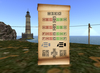

- The Captains Command Hud-
As the name suggests, this is a hud for the Captain of an N+K Vessel. Sailors and other Crew don't need this hud.
This hud is for the captain to order their crew about on an N+K Vessel. As the captain: you would be responsible for ordering around the stations on the ship. Ideally you should not be setting, trimming sails, or turning the helm yourself unless you have a small crew. You should assign roles to your crew before casting off and instruct them properly to preform their duty. Then use the Captains Hud to quickly tell them what to do.
With a simple click of any of the buttons, the hud will shout commands instantly on your behalf so you can order your crew about and sail your ship for you. There are commands for: Setting and Lowering Sails, Turning the Foremast / Mainmast / Helm / and Spanker, Firing cannons, and a few General Commands.
There are alot of buttons on this hud but they're laid out logically and all explained well in the included instructions. Here are some of the commands explained tho
------------------ The Button Layout------------------
Starting at the top you can see buttons that relate to general ship orders
M = Man your Stations! Can be used to order crew to a pose on the rigging, helm, or lookout stations
S = "Standby" which can be used in various ways. To put the crew on alert for maneuvers.
E = "At Ease!" to signal for the crew to rest or relax.
O = "Man Overboard!" for those times when someone falls off the ship.
Below these starts the main command lines for steering and propelling your ship.
The first two colored lines that contain the C and L are for the Foremast (First Line) and the Mainmast (Second Line)
C = Center the mast
X = Make the sail stall and stop propelling the ship. can think of X for 'Dead Sail'
S = Slightly off center towards starboard or portside. Not fully braced
B = Brace starboard or portside
H = Turn sheet all the way starboard or portside
------------------------------------------------------
The hud is set up to allow modifying your name that it shouts out and the commands themselves aswell. Instructions for doing this are in the included notecard.
Permissions: The Objects that create the hud are Copy/Modify. The Script in the core object is Copy.
