
Timeless Hats
I strive to deliver high quality, stylish hats. This hat is the NON ANIMATED version.
Permissions - Copy, Mod, No Transfer
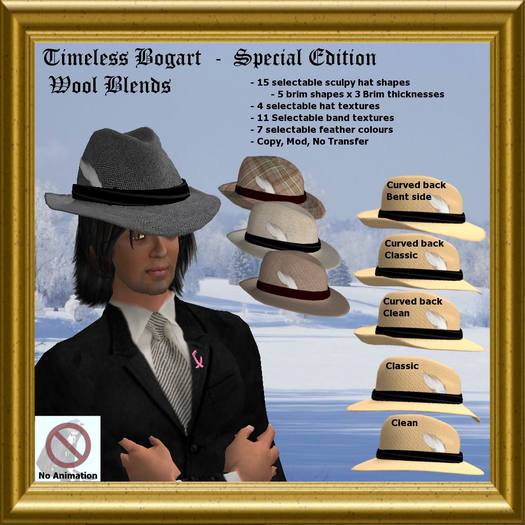
The Timeless Bogart Bent Front Fedora come with extensive scripting allowing you to choose from 4 hat textures, 11 hat band textures and 8 feather colours (one of them being transparent).
The Special Edition is in fact 15 different hat shapes, 5 different Brim shapes x 3 Different Brim thicknesses. You change the shape by scripts, and even if you resize the hat (Global resize only) the different sculpties will position themselves correctly.
THE TIMELESS BOGART - SPECIAL EDITION - NO ANIMATION
HAT SIZING
All the hats sizes can be easily changed by editing the hat while you are wearing it and holding down the Ctrl-Shift key and sliding one of the grey boxes. If you want to change the size of the hat in you hand of the deluxe model. Change the texture while wearing both hats, this will make the hat in your hand visible. Then resize the hat in your hand to be close to the size of the one on your head, you may need to reposition it relative to your hand.
The hats are positioned for smooth operation, but if you wish to move the attachment points or change the the position of the hats, a posing stand has been included for your convenience. This stand has the middle frame of the animation. You can use this stand to adjust the position of your hats for the animation. Wear both hats and adjust the position of the hat on your head to where you like, then you can make the hat in your hand visible by saying /33 hat and choosing a texture. Adjust the hat in your hand so that your right hand is holding the point of the hat.
CHANGING TEXTURES and Shapes
First wear both hats for a particular pair, then say
/33 hat - to change the hat texture
/33 band - to change the band texture
/33 feather - to change the texture colour
/33 shape - to change hat shape
You should see a menu in the upper right hand of your screen. select the texture you want. The selection screen will come back and you can try a different colour, when finished click the Done button. If you hit the ignore button, the texture change option will be disabled until you detach and reattach you hats.
Cheers
Whenever Timeless
Ver el artículo en Second Life


