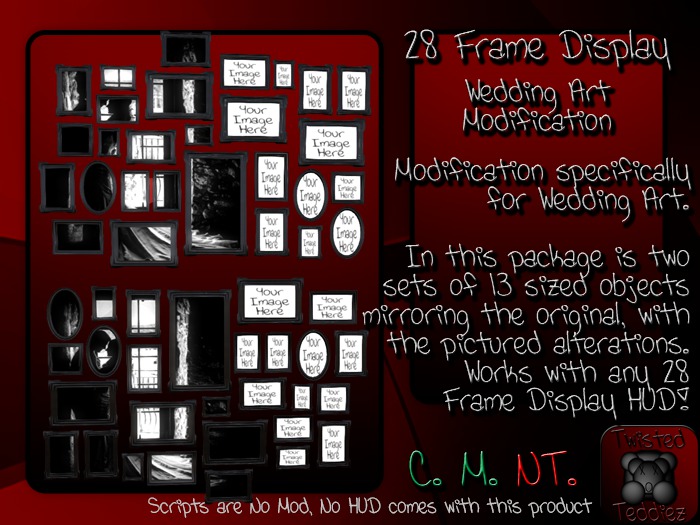
28 Frame Display MODIFICATION
This is a modification of 28 Frame Display with a single image loaded with YOUR IMAGE HERE locations modified to the base painting. The only difference from this and what comes with each HUD is that this one does NOT come with a HUD (Other HUDs in the same grouping will work on this product) and it's facing is altered to fit a specific look.
▀▄▀▄▀▄▀▄▀▄▀▄▀ SIZES ▀▄▀▄▀▄▀▄▀▄▀▄▀
SIZE # ----- DIMENSIONS (X, Y, Z) --- LI
Size 1 ------ (2, 0.02, 1.41) ------------ 3
Size 2 ------ (2.5, 0.03, 1.76) ---------- 3
Size 3 ------ (3, 0.03, 2.12) ------------ 3
Size 4 ------ (3.5, 0.04, 2.47) ---------- 3
Size 5 ------ (4, 0.05, 2.82) ------------ 3
Size 6 ------ (4.5, 0.05, 3.17) ---------- 3
Size 7 ------ (5, 0.06, 3.53) ------------ 3
Size 8 ------ (5.5, 0.06, 3.88) ---------- 3
Size 9 ------ (6, 0.07, 4.23) ------------ 3
Size 10 ---- (6.5, 0.08, 4.58) ---------- 3
Size 11 ---- (7, 0,08, 4.94) ------------ 3
Size 12 ---- (7.5, 0.09, 5.29) ---------- 4
Size 13 ---- (8, 0.09, 5.64) ------------ 4
▀▄▀▄▀▄▀▄▀▄▀▄▀ Q & A ▀▄▀▄▀▄▀▄▀▄▀▄▀
Q) Will this work with the "28 Frame Display" <insert> HUD?
A) If you are referring to any of the 28 Frame Display HUDs whether it be Woods Art, Wedding Art or Photography 01, yes it will. Spots with the YOUR IMAGE HERE will be replaced as well with the image of the selection but you can easily add your own image to it after you choose an image you like to be background to.
Q) Why so many sizes if this is a modifiable product?
A) True this is modify/copy product, but the image in the frames will distort on resizing yourself, so this is only a good idea if you are an excellent builder. So for those of you who are not that great at building, I've come up with 13 standard sizes that should fit the needs of practically anyone who desires to use this product!!
Q) I rezzed more than one and the HUD keeps changing the image!!
A) Once you've rezzed and selected the image you wish to appear on the painting you may delete the script from the root prim to permanently disable the ability for the HUD to change the image. Alternatively you may change the DESCRIPTION from #7000# to any other number to temporarily disable the HUDs ability to change the image. RESET THE SCRIPTS IN THE PAINTING FOR CHANGES TO TAKE EFFECT IF YOU CHANGE DESCRIPTION!!
Q) Can I add my own Image to this product?
A) You can, the simplest way is to select the object and click EDIT, Check the EDIT LINKED box at the top of the build menu that pops up and then carefully HOLD SHIFT and click within the yellow highlight lines to DESELECT THE FRAMES... then go to TEXTURE Tab in the build menu and click inside the TEXTURE BOX and select a Texture out of your inventory. IF IT SAYS MULTIPLE INSIDE THIS BOX BEFORE YOU SET A TEXTURE YOU MUST START AGAIN BECAUSE YOU MADE A MISTAKE. If you do this and the full image does not display before deselecting please re-add the image again, sometimes changes do not take in SL right away, DO NOT deselect or close the build menu until you've successfully made the change.
ALTERNATELY, you can drag the image 28 times, one to the middle of each frame. The first method is easier after you learn how to do it, but if you do not feel comfortable with this method this is the simpliest but more tedious way of doing it.
Q) I Tried adding my own image but I don't see the Texture Tab you talked about!
A) There should be a way to expand the build menu to show you additional building options. I use FIRESTORM with Phoenix layout so unless you use this setup I am not the best person to answer in detail beyond this.
Q) HELP! I NEED MORE HELP!!
A) Send an IM to Akayoo Nyoki for support. I will respond ASAP. If you haven't heard back in 48 hours please send a NOTECARD and another IM to AKAYOO NYOKI.
I apologize in advance if I'm not timely in response, RL takes precedence in my life and sometimes things happen that take me from SL for lengths of time. But rest assured as I do have IMs to EMAIL and will respond via email ASAP.


