
Hi!
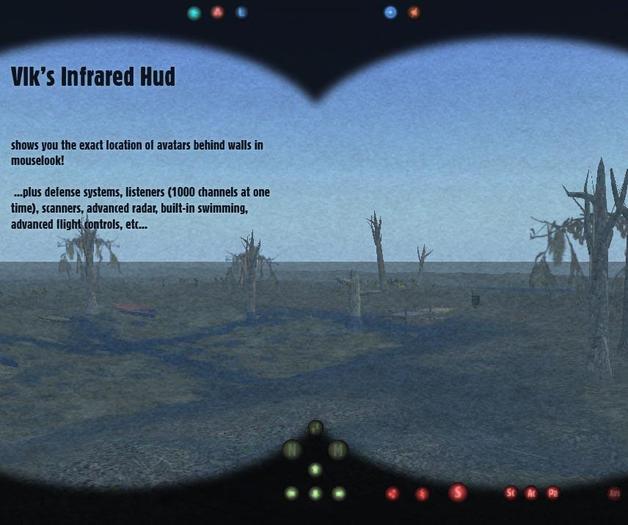
you can see through walls with this hud, see screenshots! :) working infrared
I built this hud to myself, the concept was to build a hud with the features i use a lot, build in my small inventions, and make it easy to access, easy to control.
version 1.0 has:
Swim - you'll swim if you fall into linden water (you can swim down too) with custom animations
Advanced flight-helper - easy to fly in mouselook too in any heights
Collision detection
Listeners - 1000 cannels at once, you can set easily which 1000
Sim scanner
Teleport memory - remembers about 32 place
Catapult - for emergency situations :) you fly up in the air fast. it puts down a chat bug if you can build there. after that you'll hear what they say, and you can talk to them too. just write to local, they'll hear you. With custom animation
Nonphys vehicle rezzer (with custom animation, and good controlling)
Movetotarget button (aka movelock, or anti-push)
updownleftright buttons: pushes you to a direction. its fun, and makes you fast too.
INFRARED - see-through-walls-in-mouselook
Special effects - some effects in mouselook
Shield - rezzez a simple shield around you, simple solution against annoying noobs that go close to you :) if they close when you rez it, it pushes them back even in nopush areas.
Scanning for Scripted, Active, Passive objects around you.
Radar on-off.
symbols:
< > - avatar is left/right from you,
O - avatar is behind you
no symbols above - avatar is less than 2 m from you or front of you
^ V - above/under you
S - av is scripted
M - in mouselook
T - typing
PLUS There is a gesture in the hud. You can take it from its contents. (right-click-edit-more>>-content tab-scanner gesture-drag&drop-to-your-inventory)
you can activate that gesture with the ctrl+f5 button, and it launches a scanner that goes through sim borders. it is recommended to use it in mouselook.
You can take the notecard from the hud, with the method i wrote up there ^ :)
All features can be turned on and off.
UPDATE!!!
Some bug's had been repaired like installing custom listener channels and deleting the shield.
Misc functions added:
punch - a funny feature you can hit sy with, work on nopush areas but it pushes avatars only a bit.
id-scan - scans avatars or objects key around you (for scripters)
rezzer - you can rez stuff from your hud's misc button (to put objects into the hud right click/edit linked parts/select the misc button/contents)
advanced scanner - scans for objects in the sim
stopper/alarm clock, counter (with counter you can count back from 10 or 3 on local, like if you want to start a race (3-2-1-0))
Distance calculator - you turn it on then step away and it tells you the distance between the starting position and you
Bot scanner moved into radar from misc menu. its the mobile version of THE Ex-terminator!, you can use it in sims you dont own, it tells you that the avatar on radar is a bot or sitting (if sitting it may be a bot, but it is impossible to detect if it is or not)
Keyworlds: radar scanner security vlk soyer rusty prim shield nightvision thermal infrared infra red fast moving listener swim swimming flight control nonphys push


i wish i could get a refund here. the so called infrared didnt gave the exact position of the avatars, with significant deviation. pretty much useless with no known way to recalibrating it. i've contacted the seller like a month ago, yet no replies whatsoever. bad over-priced product, bad customer service.
My lady bought this for me after I got all giddy over the infrared feature and I'm surprised to say it works. When I read the whole "see through walls" stuff I thought it would just give a cute visual and then would prompt people on how to turn prims off through a command such as shift+ctrl+alt+9. Well lo and behold I was very wrong, and it works very well for the feature I wanted it for. I did have an issue, I have a wide screen monitor and the visual prim that moves before your screen to act as if you're looking through some sort of night vision goggles didn't quite make it to all the edges of my screen... no matter though because the hud is modify so it was easy to simply stretch it. One point of advice, the bottom buttons would be better suited to sit to the left of the media option buttons, but perhaps it did and our different screen resolutions are the cause for that issue? Again not a problem because the hud is simple and easy to modify, so I simply moved those lower buttons into a place that worked for me. Bottom line, this is a hud that was meant to be nothing but useful. I really enjoy it and the simple button layout. As far as the bot scanner goes, I have no need for one and have not tested it so I can't speak to its effectiveness but I do know two things about bots... The kind I don't like usually sit still and do nothing... and if you turn on 'show look at' they don't have the gray, blue or pink cross hairs in front of their face so they are very easy to spot. Cheers and thanks for the great hud and low price tag... even though I didn't buy it :D *smooches his hunny and gives her ten stars while he's at it*
It really works! 5 STARS!
it's very interesting: the only one i sow that recognizes bot logged with copybot also.
and the animations are very funny! :)
Bot scanner doesn't work! I tested it on four known bots and it found none in range? Hmmm... False advertising?