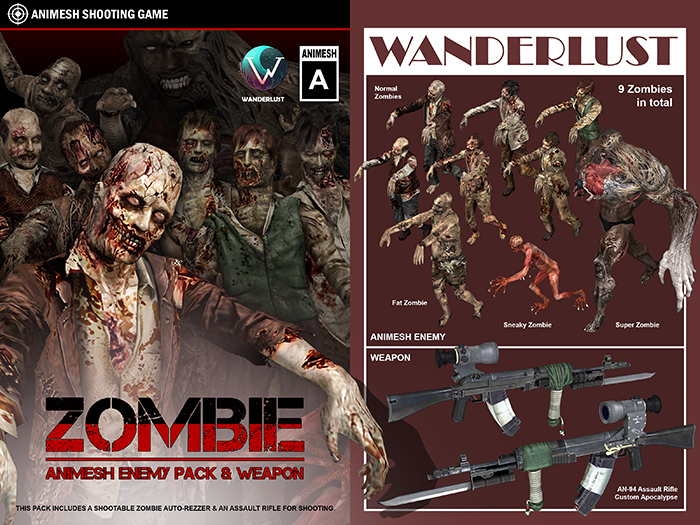
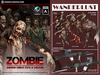
This pack includes an auto-rezzer, contains 9 shootable zombies;
and an assault rifle for shooting.
This is a casual game for relaxation. Avatars will not suffer any harm.
================================================================
How to play:
1, Rez the rezzer.
The rezzer will rez one zombie automatically while avatars get close in 5 meters.
The rezzed-out zombie was randomly picked from 9 zombies.
To accommodate system limitations, zombies can only be released from the rezzer in close proximity automatically. If you want more zombies, place more rezzers. All zombies are animesh and have a relatively high land-impact of approximately 23-27 per zombie.
2, Fight the zombie.
After rez out, zombie will roar and walk towards the nearest avatar, and chasing its target.
When getting closer to the avatar, zombie will roar and attack the avatar by punching.
The HP(Health Point)-bar of Zombies could be reduced by physical projectile from any avatar.
The rifle in this pack could be used for this purpose.
Also, an avatar could hurt the zombie by run over them.
When the zombie was hit, it will scream and swing, loses HP, but still keep chasing the target.
If the avatar stops attacking the zombie for a while, the zombie's HP will recover slowly.
When the zombie's HP reduces to 0, it will die, and turn into a pile of bones.
The ranking board will record the number of zombies killed by each avatar, which will only display top 5 avatars.
The zombies are temporary objects, an avatar has up to 1 minute time to kill the zombie, or the zombie will disappear, the score will not be registered.
3, Fight more zombies and be the top hero on the ranking board.
There are 9 zombies included in the rezzer.
6 normal zombies, 1.88m, land-impact 23~25.
1 fat zombie, 2.44m, land-impact 23.
1 sneaky zombie, 1.78m, land-impact 18.
1 super zombie, 3.14m, land-impact 27.
All zombies have the same moving speed and the same HP.
They are just different in appearances and sizes.
4, Additional information.
All zombies are [Copy] only. No [Modify] No [Transfer].
Zombies can NOT be resized.
The rezzer is [Copy] and [Modify], Land-impact 3.
Zombies are [Phantom], their movement won't be stopped by physical objects. They walk though walls.
Zombies won't fly, and won't chase flying avatars.
Zombies can accurately track and pursue targets within 20 meters of the rezzer, but their movements become clumsy or even sluggish if the distance exceeds 20 meters. The maximum range of their movement is 50 meters from the rezzer.
If multiple rezzers with ranking boards are rezzed within the sim, the ranking boards will communicate with each other and unify the scoring data. A reset will clear the ranking board, but only one ranking board at a time. To reset the data for the entire sim, each ranking board must be reset individually.
5,A small tip.
You can edit the rezzer to better suit your needs.
This rezzer includes the rezzing component and the ranking board, which are linked together but work independently.
If you need to deploy multiple rezzers in a large area, you can unlink the unnecessary attachments and ranking board from the rezzer, turning it into a simple transparent rezzer-prim that can be distributed throughout the area's various corners. This way, avatars can encounter zombies anywhere they go, and the ranking board only needs to be placed at the center or starting point of the area.
This is a personalized modification plan for this product and is not the standard usage or functionality of the product. It is only suitable for professional users who enjoy customizing products and are skilled at problem-solving. This plan has not been widely tested, and we cannot provide technical support for it. Please make sure to backup your work.
================================================================
How to use the rifle:
AN-94 Assault Rifle Custom Apocalypse.
The rifle includes two objects. Please add both RIFLE and HOLSTER.
The rifle is sling-status after being added.
Type 'd' in nearbychat to draw the rifle.
MouseLook for aiming.
Mouse left clicking in MouseLook for shooting.
'r' for reloading the rifle.
'toron' for turning on the torch; 'toroff' for turning off the torch.
Type 's' to sling the rifle.
Touch the rifle to get the menu for more functions.
Attention.
The rifle has animations for doing draw/sling, aim, reload; and 3 poses, prone, crouch, stand.
The animations' priorities are low that they might be write over by the avatar's AO.
Please turn the AO off after the rifle draws out if you have that problem.
================================================================
We kindly ask you to come to our inworld playground to see the demo before purchasing,
make sure it meets your needs.
http://maps.secondlife.com/secondlife/Starnbrough/112/123/3251
It's a playground for zombie shooting.
We appreciate your visit. Thank you.
