
By Christmas Eve each year our original Wingsong Mistletoe ranks in the top 5 or 6 of all mistletoes sold in the land. So - why make another one?
Because we wanted to offer something a little different!
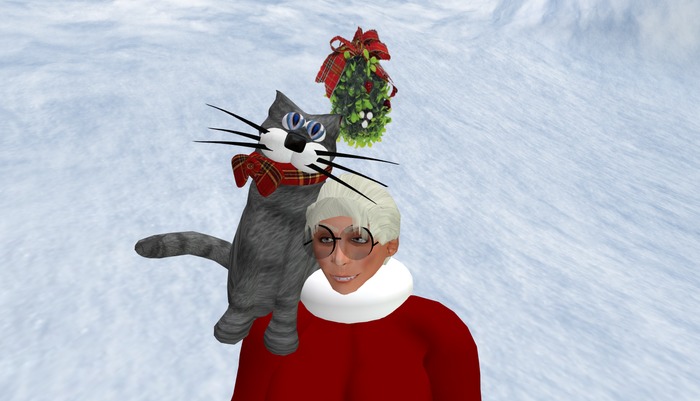
The Wingsong Mistletoe V2 is thicker and more robust than our original. It has a different set of features. Touch it to call up a menu with 8 fun Christmas sound clips. You can either ADD/WEAR it OR REZ it.
PLUS, we're offering two great BONUSES:
A - Wingsong Cat Companion B Christmas
The Wingsong Cat Companion B series of cats are among our most affectionate group of cats. Designed specifically as shoulder buddies or companions, these cats go everywhere you go and, though somewhat large, they seem most content to sit up on your shoulder.
And they're not just a bunch of pretty faces, either. Endowed with several FEATURES, they provide you with excellent companionship no matter where you go:
1 - Their eyes blink/wink.
2 - Their whiskers are flexied for a little extra animation.
3 - Touch their head for a menu of 5 fun cat sounds, including the old MEOW-MEOW jingle and a feline version of "Jingle Bells."
4 - Touch their main bodies to toggle three basic cat meows that play randomly every 3 to 5 minutes.
B - Wingsong AO HUD - Pet Walk V2. This HUD was designed specifically to use when traveling with pets and attachment companions. You don't HAVE to wear this HUD with your buddy but you might find it helps. The AO HUD included in this package is our B version; similar to our original one except it has mostly different animations in the adjunct animation system.
HOW TO USE YOUR WINGSONG AO HUD - PET WALK
1 - Disable or remove other AO's.
2 - ADD your Wingsong AO HUD - Pet Walk. It will automatically position itself near the top center of your screen. Small and nearly transparent, it is very unobtrusive and you can easily reposition and modify it.
3 - Add your companion. It also works great as a stand alone AO; this is the one I usually wear for casual use.
4 - Clicking on the Power Switch (the left button of your HUD) makes your AO active; clicking it again disables it. Very handy. The switch turns green when active and fades into near invisibility when disabled.
5 - Clicking on the Wingsong Logo (the bottom right button of your HUD) brings up a few animations I found in my closet. I thought you might enjoy animating yourself with them while playing with your pets. You must turn off your primary animations system by clicking on the power switch to use these animations; your avatar will remain in each animation you select regardless your movement until you select STOP.
This adjunct animation system expands your animation exponentially - it allows you to skate 2 ways, meditate, twirl, put your head in the ground, shuffle with a club foot, wave, and hold things while you sit, stand, and walk.
6 - Clicking on the Options Switch (the top right button of your HUD) brings up a menu of options including, among several things, this info sheet and selecting default animations for various key positions as well as a status report. The Options Switch remains green all the time symbolizing our constant ability to choose.
This AO has a total of 20 original Wingsong animations (not poses - full featured, quality animations!)
Everything here is COPY/MOD, so make all the copies you want and recolor, redecorate, resize, retexture, reDO to make it fit YOUR specs! I'm even throwing in a FREE Wingsong Modify Box, a simple, easy to use tutorial for folks with little experience in the EDIT tool.
For questions or a live demonstration of this or any of our fine/fun Wingsong products, IM Kit Ciaco!
See our large line of cats and Christmas items at our store at the Marketplace! Keywords: cats, Christmas.