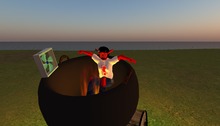
Scarecrows have a long and noble history. They've been known to stand guard over crops, provide wise counsel to little girls from Kansas, and I know of one who became the fire chief in a small town in the Northwest.
Here's what you get:
1 - Wingsong Scarecrow Head: Naturally. ADD from your inventory. Authentically crafted with original Wingsong sculpty and highly detailed texture.
2 - Wingsong Black Outfit, including black cloak (flexied; touch for menu of 88 colors), gloves, shirt, pants, and socks. Also our rather comical slightly over sized Wingsong High Top Shoes HF (classic black).
Note: We've boxed the clothes in a convenient COPY & WEAR box for you. Remove other clothing, REZ out this box, and COPY & WEAR it.
3 - Wingsong Scarecrow Companion: He looks ALOT like you do. Your companion goes everywhere you go, because frankly, being a scarecrow can get pretty lonely.
4 - Wingsong Pitchfork: Very important for scarecrows to have a good quality pitchfork for when they have to sweep up some of their stuffings. This pitchfork is especially designed and prepositioned to work with your HOLD animations in your adjunct animations menu (see below).
TIP: After you get everything on, save it as an outfit.
BONUS:
We've found that most pets or buddies that walk beside us (versus the shoulder buddies) look fairly silly when they walk with most Animation Overrides. So we developed our series of Wingsong AO HUD - Pet Walks, especially designed for walking with pet companions, large Teddy Bears, the occasional ghost and dummy (or mannequin), and now, as it turns out, fellow scarecrows. The one included in this package is our B version; similar to our original one except it has mostly different animations in the adjunct animation system.
HOW TO USE YOUR WINGSONG AO HUD - PET WALK
1 - Disable or remove other Animation Overrides.
2 - ADD your Wingsong AO HUD - Pet Walk. It will automatically position itself near the top center of your screen. Small and nearly transparent, it is very unobtrusive and you can easily reposition and modify it.
3 - Add your companion. It also works great as a stand alone AO; this is the one I usually wear for casual use.
4 - Clicking on the Power Switch (the left button of your HUD) makes your AO active; clicking it again disables it. Very handy. The switch turns green when active and fades into near invisibility when disabled.
5 - Clicking on the Wingsong Logo (the bottom right button of your HUD) brings up a few animations I found in my closet. I thought you might enjoy animating yourself with them while playing with your pets. You must turn off your primary animations system by clicking on the power switch to use these animations; your avatar will remain in each animation you select regardless your movement until you select STOP.
This adjunct animation system expands your animation exponentially - it allows you to skate 2 ways, meditate, twirl, put your head in the ground, do a fun little dance, wave, and hold things (an umbrella, your sign, whatever) while you sit, stand, and walk.
6 - Clicking on the Options Switch (the top right button of your HUD) brings up a menu of options including, among several things, this info sheet and selecting default animations for various key positions as well as a status report. The Options Switch remains green all the time symbolizing our constant ability to choose.
This AO has a total of 20 original Wingsong animations (not poses - full featured, quality animations!)
Everything here is COPY/MOD, so make all the copies you want and recolor, redecorate, resize, retexture, reDO to make it fit YOUR specs! I'm even throwing in a FREE Wingsong Modify Box, a simple, easy to use tutorial for folks with little experience in the EDIT tool.
For questions or a live demonstration of this or any of our fine/fun Wingsong products, IM Kit Ciaco!
Voir l'article dans Second Life