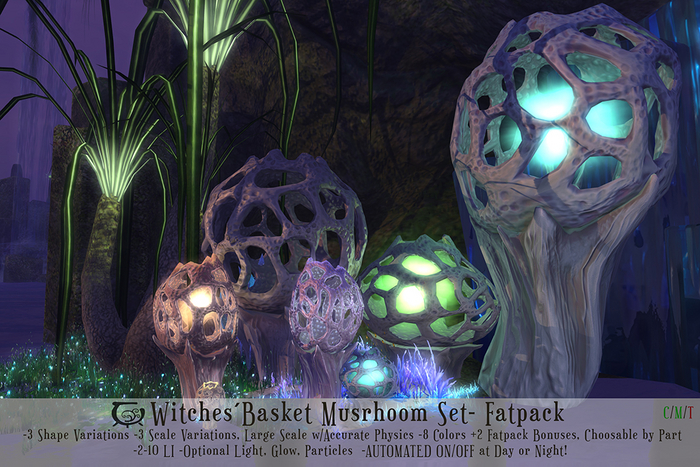

" There were many oddly shaped mushrooms growing from the flooded terrain, some were like giant trees, others had spidery roots propping them out of the shimmering waters. One of the oddest had a cage like top, with the glowing gases inside projecting dancing shadows over the otherworldly landscape..."
The Shimmering Fen
The Apprentices Journal
***************************************************************************************************
CONTENTS:
All contents are copy/mod but scripts, which are only copy.
*Note on L.I. (Land Impact): As with all mesh content, the L.I. will increase with size. Each size has optimized Land Impact and Levels of Detail (how the mesh deteriorates with distance) for the respective size. For tips on how using the different scale variants see Mod Notes. Large scale variants have accurate physics, with hollow basquets, which means avatars can get inside for roleplay or just plain play.
[CC] Witches Basket, Round- Large: 10 LI, Accurate Physics, hollow Basket
[CC] Witches Basket, Round- Medium: 4 LI
[CC] Witches Basket, Round- Small: 2 LI
[CC] Witches Basket, Squat- Large: 10 LI, Accurate Physics, hollow Basket
[CC] Witches Basket, Squat- Medium: 4 LI
[CC] Witches Basket, Squat- Small: 2 LI
[CC] Witches Basket, Tall- Large: 9 LI, Accurate Physics, hollow Basket
[CC] Witches Basket, Tall- Medium: 5 LI
[CC] Witches Basket, Tall- Small: 2 LI
***************************************************************************************************
INSTRUCTIONS:
The Mushrooms are activated through a click and hold pop-up menu to avoid accidental menu activations in active landscapes. A short click will NOT activate the menu. A click-and hold for approximately 2 seconds is necessary to activate it.
ALL: Change all the Mushroom Parts (basket, stalk, spores and light color) to 10 Different color choices, Red, Orange, Yellow, Green, Teal, Blue, Purple, Pink and Fatpack Bonuses White And Black. Changes will affect Light color and Spore Particles color even if these options are off.
Basket: Change the Mushroom´s basket to 10 Different color choices, Red, Orange, Yellow, Green, Teal, Blue, Purple, Pink and Fatpack Bonuses White And Black.
Stalk: Change the Mushroom´s stalk to 10 Different color choices, Red, Orange, Yellow, Green, Teal, Blue, Purple, Pink and Fatpack Bonuses White And Black.
LightC: Change the Mushroom´s light to 10 Different color choices, Red, Orange, Yellow, Green, Teal, Blue, Purple, Pink and Fatpack Bonuses White And Black. Changes will affect the light color even if the light is off.
SporeC: Change the Mushroom´s Spores to 10 Different color choices, Red, Orange, Yellow, Green, Teal, Blue, Purple, Pink and Fatpack Bonuses White And Black. Changes will affect the light color even if the spores option is off.
Light: On/Off Switch. Turns on/off the light effect in the mushrooms basket. The radius of the light emitted will depend on the mushrooms size and will adjust automatically to changes in the mushroom size. If the Light Option is on and the Day or Night Cycle options are activated, the light will turn on automatically during the day/night.
Spores: On/Off Switch. Turns on/off the glowing particle effects inside the basket. The size of the particles will depend on the mushrooms size and will adjust automatically to changes in size. If the Spores Option is on and the Day or Night Cycle options are activated, the spores will turn on automatically during the day/night.
Glow: On/Off Switch. Turns on/off the glowing effect in the basket and stalk. Advanced Lighting required. Like the Light and Spore options, if this option is on and the Day or Night Cycle options are activated, the glowing effect will turn on automatically during the day/night.
Day: Automate the Spores, Light and Glow, or any combination of these during your region/parcel Day! This option detects the position of the sun in your parcel/region according to the horizon. If the sun position is fixed this option will not work.
Night: Automate the Spores, Light and Glow, or any combination of these during your region/parcel Night! This option detects the position of the sun in your parcel/region according to the horizon. If the sun position is fixed this option will not work.
ScriptDel: Will delete the Control, Changer and Sun Check scripts after confirmation. You will not be able to do further changes to any settings once scripts are deleted, unless you put a copy back of the scripts in the root prim. You also have the option of just deleting the Sun Check Script if you are not planning on using the automatic Day or Night options
Close: Will close the pop-up menu and set the script to sleep. The script will automatically go to sleep too after 2 minutes without receiving a command. Click again to reactivate.
* Get 10% Discount by buying inworld!
See item in Second Life- Original Beautiful Mesh, Materials Enabled
- 3 Shape Variations, 3 Scales
- Adjustable optional glow, light, light range and more
- Full Day-Night Light & Glow Automization
- 8 Colors plus White & Black Fatpack Bonus, choosable by part


absolutely gorgeous
...they are gorgeous day and night. if youre looking for something unique for your sim, or just want to bring some fantasy into your enviroment...you have found the perfect creator..
5 Stars for the amazing creations
thank you!!
https://gyazo.com/4eef608139daff2780613a54144d29c8


