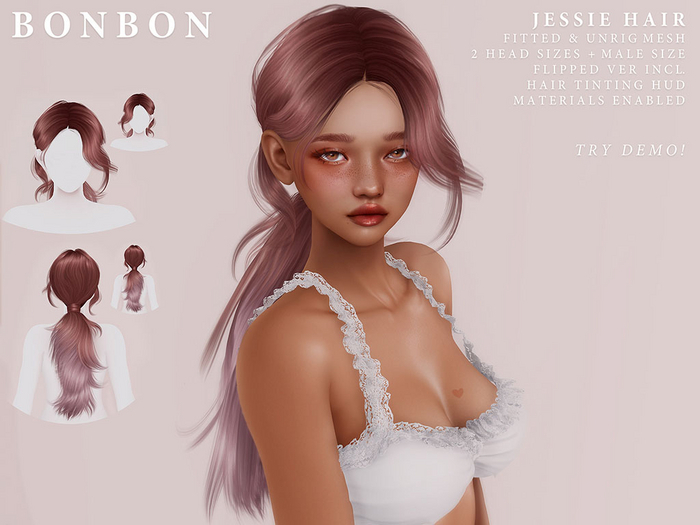


Includes: fitted hair, 2 female head sizes, 1 male size. Also includes 1 female size unrigged version. Additionally, the hair has two versions, worn flipped on left or right.
Hair HUD: Naturals, Colours, Ombres
- - - - - - - - - - - - - - - - - - - - - - - - - - - - - - - - - - - - - - - - - - - -
✂ Hair Issues Help:
- You need to have Basic Shaders and Hardware Skinning enabled in your viewers graphics settings for the hair to work properly.
- Item breaks/disappears when I zoom out? Your LOD settings are too low. You will need to turn them up.
On Firestorm, first enable advanced menu by pressing CTRL + ALT + D > Go into debug settings located in advanced menu and type in rendervolumeLODfactor > Increase number over 4 (I use the highest setting 8) Press enter > Close debug. Instructions may be different for each viewer, please Google for your viewers settings.
- If the hair is clipping through your skull, please use your mesh head HUD to hide your scalp. If you're using the system head, please use a head alpha.
-If your cheeks are clipping please adjust your Head sliders: Upper Cheeks and Lower Cheeks
If this does not work, or it is affecting other parts of your head try adjusting the other Head sliders such as head stretch, head length, forehead angle, cheek bones.
- In some poses, Hair may glitch into back of your neck/skull. It could be related to head length. However I pulled out the back scalp area to try and prevent this, though sometimes it still happens. Keep in mind, on some peoples shapes the base of the hair on the back may look slightly pulled out, I am sorry for the inconvenience.
- The hair may have alpha glitching issues with the back of the hair interacting with the back of the bangs and other places, due to how many strands this hair has, I had to make a few adjustments and compromises, hope you understand.
Known issues (SL related):
- Hair Glitch: clashing with eyelashes, head textures, transparent clothes, ect.
A quick fix that works 99% of the time is simply right clicking on the mesh, though the error is recurring, the fix is only temporary. You will need to right click the affected mesh each time the error occurs.
- Another tip is to detach the hair and reattach it, especially if the hair is glitching with itself.
- If none of these solutions work, please attach the hair HUD and apply either Material 1 or 2.
- Sometimes the hair will glitch with some objects/land around you as well. Sometimes it cannot be fixed.
- - - - - - - - - - - - - - - - - - - - - - - - - - - - - - - - - - - - - - - - - - - -
♡ Flickr:
https://www.flickr.com/photos/kittynapkitkat/
♡ Flickr Group:
https://www.flickr.com/groups/3412918@N23/
♡ Facebook:
https://www.facebook.com/bonbon.secondlife
♡ Twitter:
https://twitter.com/Bonbon_SL
♡ Tumblr (read my FAQ for additional help):
https://bonbon-sl.tumblr.com/
♡ VIP Group:
secondlife:///app/group/72f90d53-f810-27d6-80f7-e66cb83d8605/about
♡ Nana Banana (please message me if you need help)


