***OLD ITEM - SCULPTED PRIMS***
Many of the earliest prehistoric people lived in or near juniper forests which furnished them food, fuel,
and wood for shelter or utensils. Many species, such as the Chinese Juniper from eastern Asia,
are extensively used in landscaping and horticulture, and as one of the most popular species for use in bonsai.
It is also a symbol of longevity, strength, athleticism, and fertility.
American Indians, such as the Navajo, have traditionally used juniper to treat diabetes.
Native Americans also used juniper berries as a female contraceptive.
The 17th Century herbalist physician Nicholas Culpeper recommended the ripened berries for conditions such as
asthma and sciatica, as well as to speed childbirth.
Make your home greener...
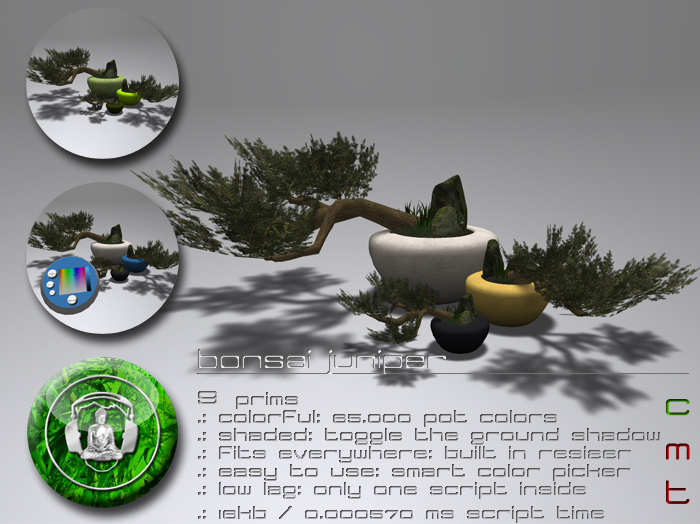
Here comes a lovely miniature juniper, to bring nature into your virtual home.
It is as unique as you are - choose from 65.000 pot colors to make it fit you and your home.
Fitting made easy with the built in low lag resizer - no matter if used as a small accessory on your shelf or
as a big eye catcher next to your front door. It will always fit.
Easy as a touch with the built in temp rez color picker panel.
***FEATURES
9 prims, copy, no mod, no trans
65.000 colors for the pot
built in resizer
ground shadow toggle
easy to use smart color picker panel
custom sculpts
high resolution textures
low lag scripting - only one script inside
***INSTRUCTIONS
BASIC:
very simple: touch the tree.
a color picker panel appears above the bonsai.
it will not use any of your land prims, since its temporary rezzed.
make the changes you want.
touch the bonsai again to make the panel vanish.
or wait until it deletes itself automatically.
ADVANCED:
CHANGING THE POT COLOR:
touch the bonsai.
a color picker panel appears above the bonsai.
choose your color by touching the coloured square on it.
maybe adjust the brightness with the slider right next the color field.
after 30 seconds the panel vanishes automatically.
or touch the bonsai again to delete the panel manually.
RESIZING:
touch the bonsai.
a color picker panel appears above the bonsai.
use the "+" button to enlarge or the "-" button to shrink the bonsai.
press "restore" to reset to the default size.
GROUND SHADOW:
touch the bonsai.
a color picker panel appears above the bonsai.
press the "shadow" button to toggle the ground shadow.
CHANGING THE PANEL POSITION:
touch the bonsai.
a color picker panel appears above the bonsai.
it might be stuck in a wall or not at the right position? no problem!
rightclick the panel and select "edit".
move the controller to a convenient position.
make sure you dont move the controller more than 10m from the pot.
let the panel vanish automatically.
next time you want to change something, the panel appears at the last position.
if you have moved the bonsai or the controller more than 30 meters, it will
reset the position to the default position again.
***NOTE
No trees were harmed for the creation of this virtual object.
Never link any parts to this tree and remove no prims.
If you have any questions about this or other .:buddhabeats:. products, please dont hesitate to IM me.
Namaste,
Roopert
See item in Second Life- 65.000 colors for the pot
- built in resizer
- ground shadow toggle
- easy to use smart color picker panel
- low lag scripting - only one script inside


Cute
I only wish this is 3Li mesh (without shadow) and modify ;-)