

Not good money back
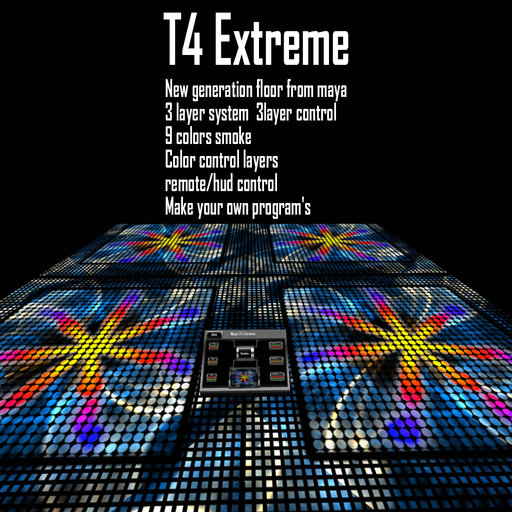
This Maya T4 floor is a complete remake of our T3 version.
youtube demo
http://nl.youtube.com/watch?v=mk52JLZxG4s
==================================================================
Maya T4 Extreme
==================================================================
Whats New!
-----------------------------------------------------------------------------------------------------------------------------------
* 3 layers (the T3 had only 2 layers), but still only 3 prims for the 10x10m floor
* whole new package of textures+animations for the center and bottom layer
* whole new package of textures for the top layer (the static one)
* better smoke: different colors and new animation for the smoke
* colors for the top layer! All non-black parts of the top layer can change the color now, too
* reorganization of the notecards: 1 notecard for each layer, for random mode and for smoke colors
* complete rebuild of the remote buttons for easier handling
* complete remake of the menus for easier handling
* main script split into several pieces, more memory now available for the textures and animations
Feature Overview:
* 3 layer floor: 2 animated layers, 1 static layer on top
* tinting with colors of all three layers possible (colors can be defined for each layer in separate)
* add your own animations (lower layer + new: center layer) or logos (top layer) easily by editing the notecards
* colored smoke wavering above the floor on command
* choose between control by owner or group
Interface:
-----------------------------------------------------------------------------------------------------------------------------------
New designed remote control (13 prims only) with 8 buttons:
Functions buttons read from top left to bottom right:
LEFT SIDE:
Admin/Power button with multiple functions:
* Smoke menu
Set smoke on/off (default is white)
Set smoke color to any color read the smoke config notecard
* Set to owner/group
* Reset system
* On/Off
* Help (gives you the 2 README notecards from the remote control)
Three color buttons: for top, center and bottom Layer
* for tinting the non-black parts of the layers into any color read the layer config notecards
CENTER:
Random button:
* On/Off to enable or disable the random mode
* Color On/Off to enable or disable the randomized of the layer colors, too
Preview screen of the floor
RIGHT SIDE:
Three animation buttons: for top, center and bottom Layer
* set any animation/texture (center and bottom layer) or texture (top layer) defined in the layer config notecards
How does that new Random Mode work?
-----------------------------------------------------------------------------------------------------------------------------------
Random Mode doesn't just randomize the textures and animations for all three layers. Instead it picks a random line
from the RandomCfg. In there are 3 names defined per line which are used for the three layers. So if you have a line
texT;Block;texC;Blue-Scrol;TexB;Wormhole;60
in the RandomCfg, it will choose Black for the Top Layer, Blue-Scrol animation for the Center layer and Wormhole for
the bottom layer. The number behind is the duration if the animation in seconds. You can set any value.
How do you add your own logo or animations?
-----------------------------------------------------------------------------------------------------------------------------------
In the remote you will find editable notecards for each layer with some lines of configuration:
TopLayerCfg:
* First you see the color lines, you can add more of them or remove the ones you don't like.
* After that you will get the tex lines. These lines define the texture UUID for the floor's top layer. Just add your own.
CenterLayerCfg +BottomLayerCfg:
* First you see the color lines, you can add more of them or remove the ones you don't like.
* After that you get the tex lines. Here you can add you own textures for the animations layers.
At the end of each line you see the ANIM_ON|LOOP|SMOOTH|ROTATE settings for each animated texture.
Just play with this for getting the effects you like. The values behind are:
face, xframes, yframes, start, length, rate
face is always 0 for our floor, for the the other values you can find a description here:
http://rpgstats.com/wiki/index.php?title=LlSetTextureAnim
Some details see notecard !README-LAYERCONFIGS
How to get the texture code in the note ?
-----------------------------------------------------------------------------------------------------------------------------------
* You go to your inventory and look up your texture you want
- 3 layers
- add own effects
- use a hud to controle
- low lag
- smoke effects


AWESOME!!!!!!!!!!!!!!!!!
These are the most amazing dance floors on all of sl. These floors are extremely low lag and very realistic! I would highly recommend these floors for any club that is shooting for realism! Great job going out to the creator ~Dawn Summers~
thanks
thanks for the great support and the demostration
cool product and low lag
cool
i like this product cool demo in the shop
good stuff
i needed a good dancefloor i am verry happy
good job tita