詳細
設備
コンテンツ
レビュー
Send a warning message, for a meeting, a class, a party, etc. to your friends, your position will be added to the message.
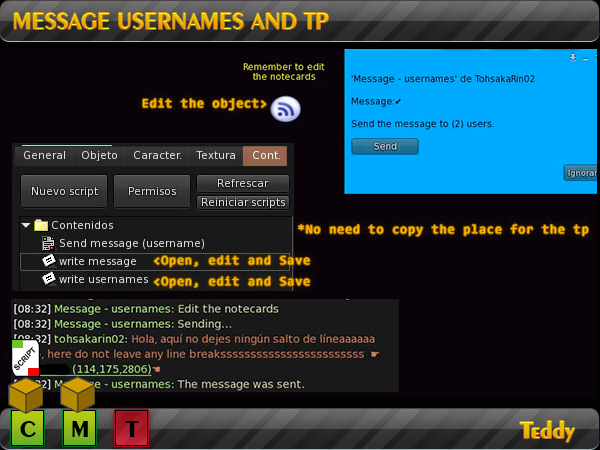
1.Add the object (Message-usernames).
2.Click right on the icon> Edit> Contents tab.
3. Open the notecard (Write message). Write the message without making any line breaks. Save.
4. Open the notecard (Write usernames). Delete the example usernames, enter yours, here if you leave a line break for each username you enter (see the image). Save.
5. Touch the icon and click Send to send the written message to the users.
Eye: The location will be taken from the position in which you are at that time and the message will be displayed plus the location (Example: Hellooo !! ☛NewSim (79,122,2584) ☚).


