
ABRANIMATIONS – ANIMAL BALLOON MAKER
This attachment lets you rez cute balloon animals that can hover over you, follow you around, or float freely in the air. You control everything with the balloon “handle” and an easy menu.
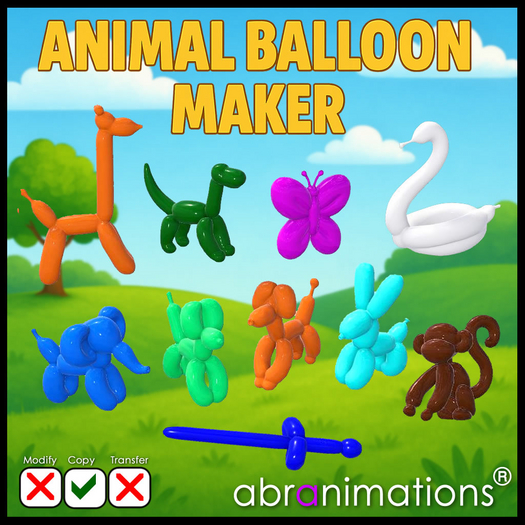
Balloon shapes in this set Include:
Dog, Poodle, Giraffe, Rabbit, Dino, Swan, Elephant, Monkey, Butterfly and Sword.
HOW TO START
Find the balloon HANDLE in your inventory.
Wear it to attach. It should attach to your LEFT HAND as its default point.
To open the main menu:
• Touch the Menu button on the included HUD
OR
• Type /7 balloon in chat (you will be the only one who sees the menu).
MAIN MENU BUTTONS
MAKE
Choose which balloon to rez (Dog, Poodle, Giraffe, Rabbit, Dino, Swan,
Elephant, Monkey, Butterfly or Sword).
• Click MAKE, then choose a shape.
• The handle briefly plays a building animation, then rezzes your balloon nearby.
Color
Pick a colour for your next balloons.
• Opens the colour list.
• The handle tints itself to preview the current colour.
Height
Adjust how high balloons float above you.
• This is “extra height above your head”.
• You can move them lower or higher, or reset to the default.
LUCKY
One-click random balloon!
• Random colour + random animal type.
• Great for surprises or parties.
POP ALL
Tries to pop all compatible balloons created in the region.
• Use if things get too crowded or you want to clear up quickly.
Steal: On / Off
Controls whether other people can “steal” your balloon (if the balloon
itself supports that feature).
• On = others can grab your balloon.
• Off = balloon stays yours only.
Attach: On / Off
Controls what new balloons do when they are rezzed.
• On = new balloons hover and follow you automatically.
• Off = new balloons float where they are rezzed and do not follow.
GET HUD
Gives you the “Modelling Balloon Easy Control HUD” (if included).
• Wear the HUD for extra controls specific to the balloon models.
COLOUR MENU
From MAIN MENU choose: Color
You’ll see a list of preset colour names (Red, Orange, Yellow, Lime, Green, Teal, Cyan, Blue, Purple, Magenta, Pink, White, Grey, Black, Gold, Brown or Custom). A balloon will appear in your hand to help you visualize any colors you choose. This will disappear again the next time you make a balloon.
CUSTOM
• Opens the Colour Mixer for fine-tuning.
• “More Red / Less Red / More Green / Less Green / More Blue / Less Blue”
– adjust each colour component.
• “Lighter / Darker” – brighten or darken.
• “More Grey / More Vivid” – soften or intensify the colour.
• “Done” – accept the current colour and return to the main menu.
Your chosen colour will be used for all new balloons until you change it again.
HEIGHT MENU
From MAIN MENU choose: Height
Buttons:
• Higher +0.25 / Lower -0.25
• Higher +0.5 / Lower -0.5
• Reset
• MAIN MENU
This adjusts how far above your head the balloons float.
Typical useful range is around 0–3 metres above your head.
If your balloon looks too high or too low, come back here and tweak the setting.
MAKE MENU (BALLOON TYPES)
From MAIN MENU choose: MAKE
You’ll see buttons for the available balloon shapes:
Dog, Poodle, Giraffe, Rabbit, Dino, Swan, Elephant, Monkey, Butterfly, Sword
Click a type to make that balloon.
CHAT SHORTCUTS
On channel 7 (local chat):
/7 balloon
/7balloon
• Opens the main menu.
/7 lucky
/7lucky
• Instantly makes a random balloon with a random colour.
TIPS & NOTES
• The handle is usually invisible when not making a balloon. It shows briefly while you’re choosing colours or building.
• Your colour choice is remembered even when the handle is hidden.
• If animations stop working, detach and re-attach the handle and re-grant permissions.
• If a balloon doesn’t appear, check there is room to rez and that the land allows object rezzing.
• The sword in this balloon is a special balloon, if you click on this it will attach so you can fight people. For other people it will attach as a temporary attachment. When other people click the sword balloon to Grab it, it will ask them for permission to attach.
Have fun making balloon animals!
Ver el artículo en Second Life