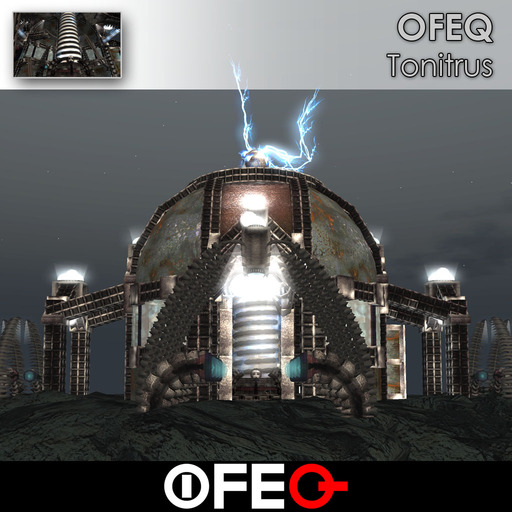




Yet another epic build by OFEQ. The ancient alien technology discovered and harnessed by modern day scientists. Don't touch the coils, or you may get zapped. The structure is 83.5x83.5 meters in size without the entryway arches, 135x135m with them, and about 144.5x144.5m with the platform. The structure alone, without any of the optional components, is 700 prims.
You have full permission to modify and customize the look of the structure, if you wish. Note, I do not support modified versions. If you change the structure, I cannot help you troubleshoot or repair it.
When you first rez your item, you will see a miniature coil in front of you. This is also referred to as the rezzer throughout this document.
REZZING INSTRUCTIONS
REZZER MENU OPTIONS
Platform – Toggles the rezzing of the platform. This adds 83 prims. The platform is helpful if you wish to rez the structure in the sky, or on uneven terrain.
Entryway Arches – Toggles the rezzing of the entryway arches. This adds 608 prims.
Accessories – Toggles the rezzing of crates, work lights, toxic drums, and floor cabling. This adds 151 prims.
Rez Footprint – This creates a holographic image of the structure's footprint. This is to assist you in locating the structure in a good spot. When you move or rotate the rezzer, the footprint will move and rotate to reflect how your structure will rez, once you choose the rez option. This is helpful to be sure you don’t accidentally rez part of your structure onto neighboring land. If you move the rezzer, and the holographic image does not adjust itself, wait a few seconds. If it seems to take too long, you can choose the Delete Footprint option and then rez a new one. The holographic image is only temporary, so you will have to rez a new one, if you do not finish your adjustments in about 60 seconds. The holographic footprint includes the markers for the entryway arches. If you choose not to rez these, you can ignore their markers while positioning the rezzer. The main structure's footprint is indicated by the grid on the hologram.
Delete Footprint – This will turn off the holographic image. Don’t worry if you forget to use this option. The holographic image is only temporary, and should disappear on its own.
Rez Structure – This will rez Tonitrus.
Delete Structure - This will initiate the self destruction of the structure. Note, this will not work if you hit the Done button. If the structure is rezzed, and you hit the Done button all self destruct scripts are removed, to reduce lag. Also, if you leave the structure rezzed for approximately 24 hours, the self destruct scripts remove themselves. This is also to reduce lag.
Help – Gives you this manual.
Done – This "burns in" the build. Once you hit this button, the self destruct scripts are removed from the structure, to reduce lag. Be absolutely certain you are pleased with the location of the structure before you hit this button. If you hit this button, and decide you want to delete the structure, you will have to delete each piece manually. Remember, if you hit the Done button, the only way to remove the structure is to manually delete it. DON'T hit the Done button, unless you're absolutely certain you are going to leave the structure where it is.
CONTROL PANEL
At the base of the coil you will find a control panel display. Touch this display to bring up the control menu.
Lights On – This turns the lights on.
Lights Off – Turns the lights off.
Power On – This powers up the coils. When the coils are on, you will hear and see electrical discharge. If damage is enabled on the land, the coils will inflict damage if touched. Also the toroid at the top of the coil will fire large bolts of lightning into the air, and reach toward anyone who gets near. They can kill. The coil also has a gravitational effect on agents near the top scaffolding.
Power Off – This shuts down the coil.
Access – This allows the owner to set the access level on the control panel.
Owner Only – Only the owner may access the control panel, to turn on or off the lights and power.
Group Only – The owner and group members may access the control panel.
Public – Anyone may access the control panel.
http://ofeq.org
Ver el artículo en Second Life Ver vídeo »- One of the most unique builds in SL
- Custom sculpts and textures
- Custom sounds
- Shadows


