

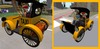

This is a RIDEABLE REZ vehicle; you must REZ it out in a REZ zone or land for which you have perms, and it supports passengers.
This car is part of our Wingsong RIDE LITE DB series. Our RIDE LITE vehicles are distinguished from our ACS/KCP based vehicles (which are identified as a RIDE with a version number at the end - example: RIDE V3). The RIDE LITE system has a few less bells and whistles but tend to handle lag more efficiently because they are streamlined. The DB system (for Dune Buggy) allows certain cars to drive more like a dune buggy than a car (they pop wheelies, they bank, and their front wheels don't pivot).
Do NOT misunderstand - just because these vehicles are streamlined doesn't mean they don't have loads of features! We've simply integrated only the features that we consider essential to an enjoyable experience without including options that most people don't even use.
We also make a wearable ADD version of this car that travels anywhere you do and does not support passengers, sold separately at our Marketplace store.
FEATURES and HOW TO USE
1 - As the owner of the car you are the only one who gets to drive. Turn off other Animation Overrides. REZ your vehicle at a REZ zone or other land that you have REZ perms. RIGHT CLICK on the taxi and select SIT HERE. (Note: If you want this car in an unlocked version let me know; I'll send one over FREE at no additional charge to anyone who purchases the locked version.)
Your passenger can right Click on the car and select SIT HERE after you are in the car.
2 - Move using your arrow keys. To stop take your fingers off the keys. To pop a wheelie press the PAGE UP key.-
3 - To shift gears up (go faster) press your SHIFT and RIGHT ARROW keys at the same time. To shift back down press your SHIFT and LEFT ARROW keys at the same time.
4 - Both the driver and the passenger can adjust their seats by clicking on their respective seats for the adjustment menus.
5 - Your car is embedded with original Wingsong animations for the driver and passenger.
6 - Your wheels turn as you move.
7 - Change your license plate by clicking on it. Add your own bumper stickers and tags by dragging them from your inventory into the plate's Content Tab (maximum 22 files).
8 - Click on the panel behind your seat for some fun horn audio clips. You can easily add your own files by dragging them from your inventory to the panel's Content Tab in the EDIT MENU (maximum 22 files).
9 - Click the front of your car to toggle your lights on and off.
10 - Your car is COPY/MOD - naturally! Note that in your inventory it will show as "No Modify" but when you REZ it out you see that you can, in fact, modify. This is because the proprietary scripts must remain no modify.
For questions or a live demonstration of this or any of our fine/fun Wingsong products, IM Kit Ciaco!
Please Note: Don't be misled by the low cost of our items. We can afford to do this because we create excellent items and provide excellent customer service and support.
To see our line of RIDE LITE vehicles available at the Marketplace store, keyword: ride lite.
Veja o item no Second Life


