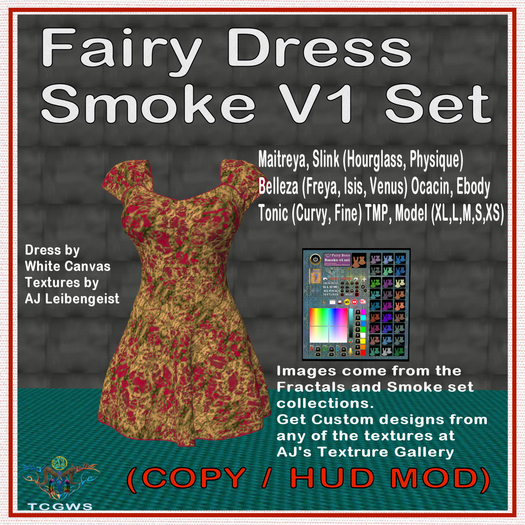


AJL~SmokeV1-FairyDress
PDF: http://sl.thunderchild.net/doc/AJL~SmokeV1-FairyDress.pdf
Rev. 03/08/22
NOTE:
The maker of the dress is White Canvas and the Textures are by AJ Leibengeist.
The dresses come in women’s models Maitreya, Slink (Hourglass, Physique) Belleza (Freya, Isis, Venus) Ocacin, Ebody Tonic (Curvy, Fine) TMP, Model (XL, L, M, S, XS). The Demo set has all the models to try before buying.
FEATURES
• Mesh models
• 1 Full Standard Sized HUD with 27 textures
• Main Textures are made from the Smoke Collect Textures set
• Fractals and Smoke design textures for trim and sleeves
Dress Model Displays
Most clothing items have demos, and they can be viewed at the Milda location. http://maps.secondlife.com/secondlife/Milda/129/156/51.
HUD & USE
The HUD system I use is by Creative Designs. The HUD and clothing work on a channel number. Similar clothing lines will have the same channel number. All Women's Polo shirts are on the same channel and can be used with all the sets of HUDs for the same Polo shirts. The HUD provides control for color tinting, shininess, glow, alpha, texture and bright for the clothing.
Once you have added the clothing to what you are wearing, double click on the HUD to attach it to the screen. You can move it around using the editing tools. Hit the open/close button to close and reopen it so the scripts have all reset.
You will need to touch the select the shirt button and then touch the select texture button. This ensures the clothing is selected.
You can now play with the other sections. The Color tinting will apply a color to the clothing. The sizing buttons will change the overall size of the clothing. The eye on the Alpha row, will make the clothing transparent. The Red Xs will cancel any one of the alterations.
The Info & RL Links provide information and landmarks for inworld sites. The HUD label will open the SL Marketplace page and the URL PDF will open the current PDF file from SL.Thunderchild.net.
The diagram points out the areas on the HUD.
TOS
Demos are free items, and you can get more if needed.
Please do not resale these textures and patterns by themselves in Second Life. Do not sell them on other Vrs without permission. Do not use them in RL products. Contact me in SL for any other SL or RL use. In SL, they must be part of a build and not as Full Permissions. (Full Perm). Refer to the Second Life Terms of Service https://www.lindenlab.com/legal/second-life-terms-and-conditions
UNPACKING CASPERVEND
CasperVend items come in a box and will probably show up in your Objects Folder. You'll need to rez the box and open it to copy to your inventory. Since there are no copy permissions, you'll get a message that they have to move to inventory. There is a Sandbox on the Milda shops.
UNPACKING SL MARKETPLACE
Marketplace purchases will not be boxed and can be viewed in the contents tab on the product page. Those items will go to your Received Items Folder in your Inventory. Items with no copy permissions, will move in and out of inventory as you rez them and take them back.
ADDITIONAL INFORMATION
The TCGWS project homepage is http://sl.thunderchild.net and the Artist's homepage is http://thunderchild.net. Special arrangements and designs are available by contacting the artist in-World (Thunderchild Allen aka AJ Leibengeist).
AVAILABILITY
Much of the artwork and textures that are available in Second Life are also available or similar products and textiles in Real Life. Find more information at http://thunderchild.net or grab the product "business & Artist Information" from the SL MP or CasperVend in-World.
thumbnails on last pages of PDF
- • Mesh models
- • 1 Full Standard Sized HUD with 27 textures
- • Main Textures are made from the Smoke Collect Textures set
- • Fractals and Smoke design textures for trim and sleeves
