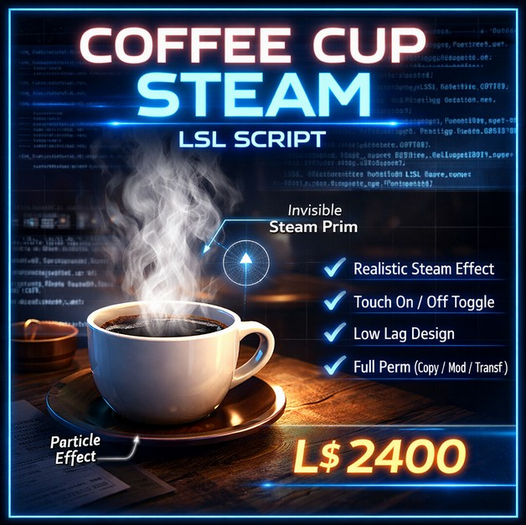

If you’ve ever dropped a coffee cup into Second Life and thought, this looks dead, this script fixes that problem instantly.
The Coffee Cup Steam LSL Script adds a subtle, realistic steam effect that rises naturally from mugs, cups, bowls, or any hot beverage prop. No gimmicks. No heavy lag. Just clean particle behavior that makes objects feel alive.
This script was written for creators, decorators, café owners, roleplay environments, and anyone who wants small details to actually matter.
Here’s the thing: most particle scripts you find are either too aggressive or too complicated. Steam shoots out like a rocket, fills the whole room, or requires menus, permissions, and unnecessary logic. This one doesn’t. It stays quiet, believable, and efficient.
What this script actually does
When the object is rezzed, the steam starts automatically. A soft stream of particles rises upward, gently expanding and fading out—exactly how steam should behave in real life.
Touch the object once, and the steam turns off. Touch it again, and it turns back on. That’s it.
No dialogs.
No menus.
No spam in local chat.
No listener overhead.
The steam uses an angle cone emission pattern, which keeps it mostly vertical while allowing just enough variation so it doesn’t look robotic. Particles start small, grow naturally, and fade out smoothly. The transparency curve avoids harsh pop-ins and ugly cutoffs.
The result is steam that looks good from close up and doesn’t turn into visual noise from a distance.
Designed for real Second Life usage
This script was built with actual in-world use in mind, not as a demo toy.
It’s lightweight and optimized. The burst count and rate are conservative by default, meaning you can drop multiple cups in a café, restaurant, kitchen, or roleplay sim without turning the area into a particle storm.
You can place the script directly into:
A coffee cup
A tea mug
A bowl of soup
A kettle
Or a tiny invisible prim positioned above the object
Using a separate steam prim gives you precise control over placement and scale, which is how most professional builders will want to use it.
Customizable without breaking anything
The script is clean and readable. Even if you’re not an advanced scripter, you can tweak it safely.
You can:
Increase or reduce steam strength
Make steam rise faster or slower
Adjust particle size for large mugs or small cups
Change transparency for thick or light steam
Add your own smoke or steam texture
Everything important is clearly defined inside the particle system block. No hidden logic. No tangled states.
If you want to resell this script inside your own products, you can. It’s full permission.
Why this sells well
Small details sell products.
A static coffee cup is decoration.
A steaming coffee cup feels used.
Customers notice these things, even if they don’t consciously realize why one product feels better than another. Steam implies heat. Heat implies freshness. Freshness implies realism.
That’s why this script works well for:
Café and restaurant décor
Roleplay sims
Home and kitchen sets
Photography props
Marketplace products and bundles
It adds perceived value without adding complexity.
Simple installation, clear user flow
From a buyer’s perspective, setup is straightforward:
Rez the object
Drop the script inside
Save
Steam appears instantly
Touch toggles on/off. That’s the entire learning curve.
This makes it ideal for customers who aren’t scripters. You don’t need to explain channels, permissions, or configuration menus. The script behaves exactly how users expect it to behave.
Full permission, creator-friendly
This script is sold full perm:
Copy ✔
Modify ✔
Transfer ✔
You are free to:
Include it in your own builds
Sell it inside products
Bundle it with décor sets
Customize and brand it
No restrictions. No license gymnastics.
- Realistic rising steam particle effect
- Touch to toggle steam on and off
- Lightweight, low-lag design
- Fully customizable particle settings
- Full permission (Copy / Modify / Transfer)